Introduction
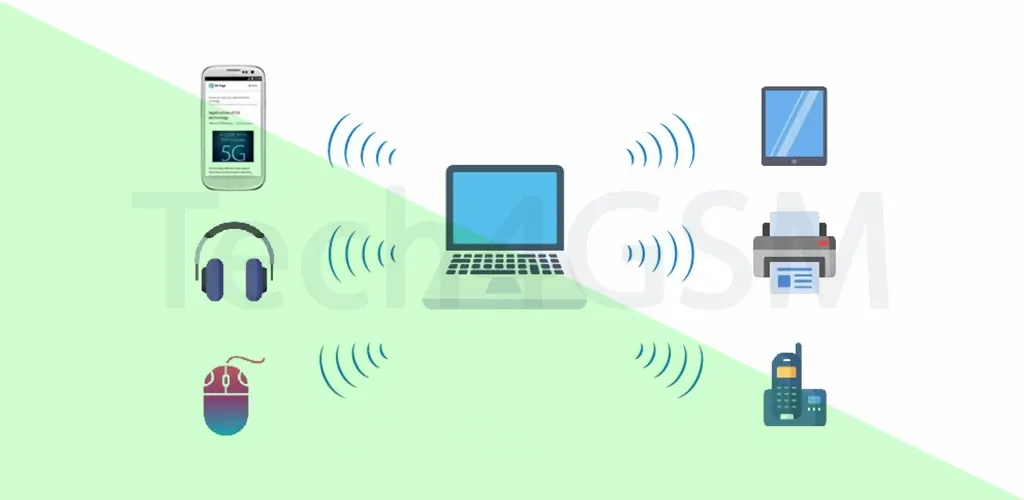
A Personal Area Network (PAN) is like your personal tech bubble! It’s a small network that connects your gadgets—like smartphones, laptops, tablets, or printers—within a short range (up to 10 meters). Imagine syncing your wireless earbuds to your phone or transferring files between your laptop and tablet without cables. That’s PAN in action!
PANs are perfect for home offices, small workspaces, or even your living room. They let devices “talk” to each other, share data, or print documents without needing the internet. While PANs usually rely on wireless tech like Bluetooth, they can also use wired connections like USB.
Did You Know?
The idea of PAN was first introduced by Thomas Zimmerman at MIT’s Media Lab and later boosted by IBM’s Almaden Research Lab. Today, PANs power everything from smartwatches to medical devices!
Wireless PAN (WPAN): No Wires, No Worries!
A Wireless Personal Area Network (WPAN) is a cable-free version of PAN. It’s designed for one person or a tiny team, focusing on short-range, low-power connections.
How Does WPAN Work?
WPAN uses technologies like:
- Bluetooth (for headphones, speakers).
- Zigbee (smart home devices).
- Infrared (old-school TV remotes).
- Ultra-Wideband (fast data transfers).
Unlike Wi-Fi (which covers a whole building), WPAN stays close to you. For example, your fitness tracker sending data to your phone uses WPAN.
WPAN vs. LAN:
- WPAN: Centered around you (1-10 meters).
- Wireless LAN (Wi-Fi): Covers a building (up to 100 meters).
Wired PAN: When Cables Make Sense
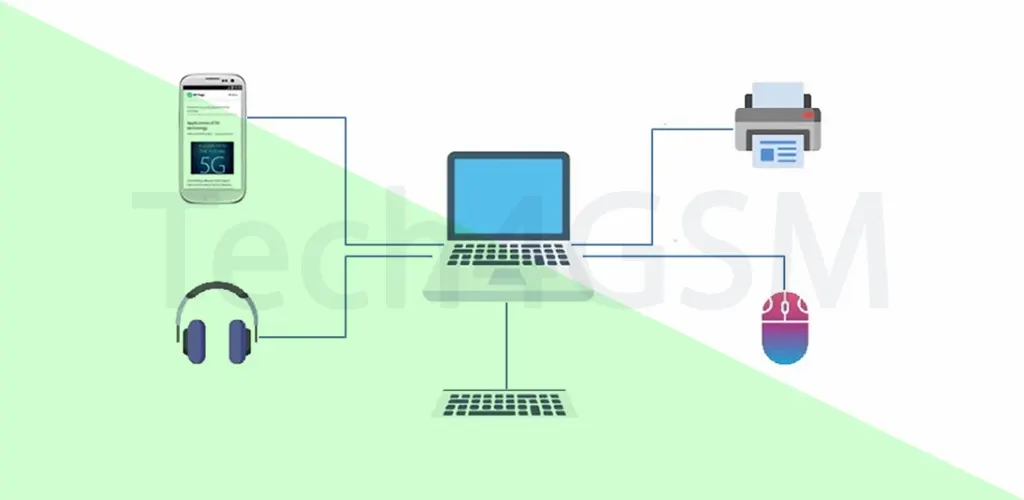
Yes, PANs can use wires too! Wired PANs are great for connecting gadgets that sit close to you, like a printer or external hard drive.
Popular Wired PAN Tech:
- USB: Printers, webcams, or charging cables.
- FireWire/IEEE 1394: High-speed video transfers.
- Thunderbolt: Ultra-fast data for creatives.
Why Go Wired?
- Faster speeds (e.g., transferring 4K videos via Thunderbolt).
- No battery drain.
- Stable connection (no interference).
5 Real-Life PAN Examples
- Body Area Network (BAN):
- Medical sensors implanted in the body to monitor heart rate or blood sugar.
- Your smartwatch syncing health stats to your phone via Bluetooth.
- Wearable Tech:
- Fitness bands tracking steps and sharing data with your tablet.
- Smart glasses displaying notifications from your phone.
- Home Offline Network:
- Connecting a printer, TV, and gaming console via Bluetooth—no internet needed!
- SOHO Setup:
- A home office with a laptop, wireless printer, and smartphone linked for work tasks.
- Infrared Control:
- Using a remote (with infrared) to adjust your AC or TV.
PAN vs. LAN: What’s the Difference?
| Feature | PAN | LAN |
|---|---|---|
| Range | Up to 10 meters | Up to 100 meters (or more) |
| Users | 1 person | Multiple users (office/school) |
| Speed | Low to medium | High (gigabit speeds) |
| Use Case | Smart homes, wearables | Offices, campuses, large homes |
| Tech Used | Bluetooth, USB, Zigbee | Ethernet, Wi-Fi |
Fun Fact: Your smartphone acts as a PAN hub, connecting to earbuds, smartwatch, and car stereo!
Pros of PAN: Why You’ll Love It
- Wireless Freedom: No messy cables!
- Easy Setup: Pair devices in seconds.
- Energy Efficient: Bluetooth uses minimal power.
- Secure: Short range = harder for hackers to access.
- Portable: Take your network anywhere (e.g., travel with a Bluetooth keyboard).
Cons of PAN: Know the Limits
- Short Range: Can’t connect devices across rooms.
- Slow Transfers: Bluetooth lags behind Wi-Fi speeds.
- Interference Issues: Microwaves or walls can disrupt signals.
- Cost: Premium devices (e.g., Thunderbolt docks) are pricey.
- No Broadcasts: Can’t send messages to all devices at once.
Future of PAN in 2025
By 2025, PANs will get smarter! Expect:
- AI Integration: Devices predicting your needs (e.g., adjusting room lights based on your mood).
- 6G Support: Faster speeds and lower latency.
- Health Tech: More advanced medical PANs for real-time patient monitoring.
FAQs About PAN
Q1. Can a PAN work without the internet?
Yes! PANs connect devices directly. Example: Printing via Bluetooth without Wi-Fi.
Q2. Is Bluetooth the only PAN technology?
No. USB, Zigbee, and Infrared are also used.
Q3. Can PANs be hacked?
Rarely, due to short range. Still, use secure pairing methods!
Q4. What’s the max number of devices in a PAN?
Bluetooth allows up to 7 connected devices.
Q5. Are PANs only for homes?
No! Hospitals use PANs for wireless medical devices.
Final Thoughts
PANs simplify how we interact with tech daily. Whether it’s syncing your smartwatch or printing wirelessly, PANs make life easier. As we move into 2025, expect even smarter, faster PAN solutions!