
Introduction
WhatsApp has revolutionized communication with its voice note transcription feature, making it a practical solution for users who prefer to read messages instead of listening to audio. Whether you’re in a meeting, on public transport, or simply need to access a voice note discreetly, this feature is a game-changer. Let’s dive into how to use it effectively and maximize its benefits.

Why Are WhatsApp Voice Note Transcripts Useful?
Voice notes are popular, with 70% of WhatsApp users relying on them for quick communication. However, there are situations where playing a voice note isn’t feasible:
- Busy office or library: Playing audio might disturb others.
- During meetings: Listening to voice notes is inappropriate.
- On noisy commutes: Background noise can make it hard to hear.
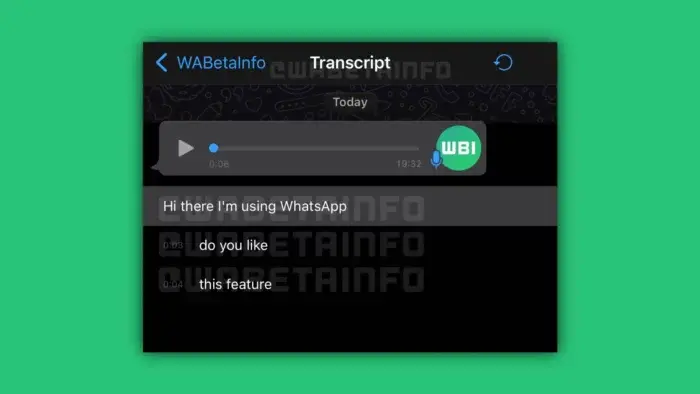
The voice note transcription feature addresses these challenges. It converts audio into text, making conversations accessible anywhere and anytime. You can read the content without needing headphones or worrying about privacy.
Key Benefits:
- Convenience: Access messages without audio distractions.
- Time-Saving: Skim through important messages quickly.
- Accessibility: Helps people who are hard of hearing or prefer reading.
How to Set Up WhatsApp Voice Note Transcripts
To use this feature, ensure your WhatsApp app is updated to the latest version. Updates often include new features, bug fixes, and improved performance.
Step-by-Step Guide:
- Update WhatsApp:
Go to your device’s app store and update the app to its latest version. - Play the Voice Note:
Open the chat containing the voice note. Tap the play button to start listening. - Activate Transcription:
- In many cases, transcription starts automatically.
- If not, go to your WhatsApp settings and enable the feature manually under “Voice Note Settings.”
- Read the Transcript:
The transcribed text will appear in the chat window. You can refer to it anytime without replaying the audio.
Note:
- This feature may not support encrypted voice notes.
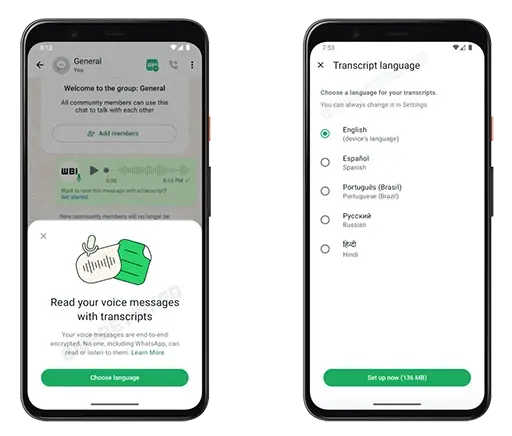
- Language availability varies, so check updates for expanded support.
Practical Tips for Using WhatsApp Voice Note Transcripts
Here are some ways to make the most of this feature:
1. Simplify Multi-Tasking
When you’re in a busy environment, reading a transcript is more discreet than listening to a voice note. For example:
- In a library or coffee shop: Continue your work or study without disturbing others.
- During travel: Avoid playing audio in public spaces.
2. Save Important Information
Extracting key details like addresses, dates, or phone numbers is easier with transcriptions. Instead of replaying the voice note:
- Copy the required text.
- Paste it into your notes, calendar, or reminders.
3. Improve Accessibility
This feature is a significant step forward for inclusivity:
- Hard of hearing: Users who face auditory challenges can access the message in text form.
- Non-native speakers: Reading can sometimes be easier than listening to unfamiliar accents.
4. Organize Your Chats
With transcripts, you can keep track of crucial points without needing to replay audio messages. This is especially useful for group chats or long conversations.
Drawbacks of WhatsApp Voice Note Transcripts
While this feature is incredibly useful, it’s not perfect. Here are some common challenges:
1. Accuracy Issues
- Accents: Strong accents might lead to incorrect transcriptions.
- Background noise: Loud environments can distort the transcript.
2. Limited Language Support
Currently, the feature supports a limited number of languages. If your preferred language isn’t available, you’ll have to wait for updates.
3. Privacy Concerns
- Transcriptions might raise concerns for users worried about their data being processed. However, WhatsApp emphasizes end-to-end encryption, ensuring user privacy.
How WhatsApp Improves Transcriptions
WhatsApp is constantly updating its voice recognition technology to enhance accuracy. With time, the feature is expected to:
- Support a wider range of languages.
- Handle diverse accents and noisy environments more effectively.
Keep your app updated to benefit from these improvements.
Conclusion
WhatsApp’s voice note transcription feature is an innovative addition that makes communication easier and more inclusive. Whether you’re in a noisy place, unable to use headphones, or prefer reading over listening, this tool ensures you don’t miss important messages.
As technology evolves, the transcription feature will continue to improve, offering more accuracy and expanded language support. Make sure to update your app regularly and start using this convenient feature to streamline your WhatsApp experience.