Introduction
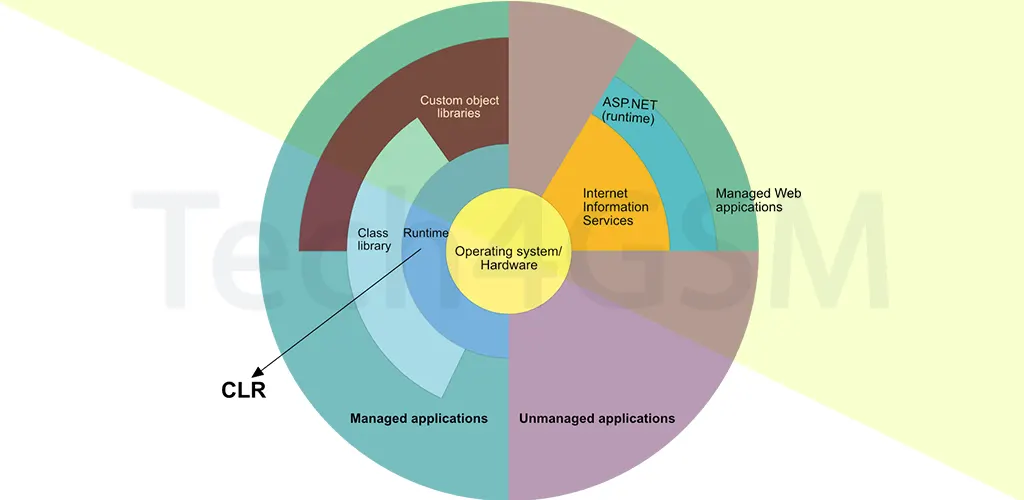
The Common Language Runtime (CLR) is the backbone of Microsoft’s .NET Framework, acting as a virtual machine to execute .NET applications. It bridges the gap between code written in languages like C#, VB.NET, or F# and the machine-specific instructions your computer understands. Think of CLR as a universal translator that ensures your app runs smoothly, whether you’re on Windows, Linux, or macOS.
Key Takeaway: CLR makes .NET programs platform-independent, secure, and memory-efficient.
How CLR Works: A Step-by-Step Breakdown
1. Compilation & Execution
- Step 1: You write code in C# or another .NET language.
- Step 2: The compiler converts it into Intermediate Language (IL) or MSIL—a universal, non-machine-specific code.
- Step 3: At runtime, CLR’s Just-In-Time (JIT) Compiler translates IL into machine code tailored to your system’s CPU.
Why This Matters: IL allows your app to run anywhere CLR is installed. No recompilation needed!
2. Services Provided by CLR
- Automatic Memory Management: CLR’s Garbage Collector (GC) cleans up unused objects, preventing memory leaks.
- Type Safety: Ensures variables match their data types (no integers mistaken for strings).
- Security Checks: Scans code for vulnerabilities before execution.
Real-World Analogy: CLR is like a vigilant security guard + janitor for your code.
3. Cross-Language Integration
- Common Type System (CTS): Lets C# talk to VB.NET or F#. For example, a C# “int” is the same as VB.NET’s “Integer”.
- Common Language Specification (CLS): Sets rules so all .NET languages play nicely together.
Example: Build a C# library and use it in a VB.NET app without rewriting!
Key Components of CLR
1. Common Language Specification (CLS)
- Defines rules for .NET languages to ensure compatibility.
- Example: All languages must support basic types like int, string, and bool.
2. Managed vs. Unmanaged Code
- Managed Code: IL code managed by CLR (e.g., C# apps). Benefits from GC and JIT.
- Unmanaged Code: Legacy code (e.g., C++ Win32 APIs) not controlled by CLR.
Pro Tip: Mix managed and unmanaged code, but handle memory manually in unmanaged parts.
3. JIT Compiler
- Converts IL to machine code on the fly.
- Types of JIT:
- Pre-JIT: Compiles entire code at once (used in deployment).
- Econo-JIT: Compiles on demand, then discards (lightweight).
- Normal-JIT: Compiles methods when first called (balances speed and memory).
Why JIT?: Optimizes code for the current machine’s hardware.
4. Garbage Collector (GC)
- Automatically frees memory from unused objects.
- Generations in GC:
- Gen 0: Short-lived objects (e.g., temporary variables).
- Gen 1: Buffers between Gen 0 and Gen 2.
- Gen 2: Long-lived objects (e.g., global data).
Fun Fact: GC runs in the background, so your app rarely pauses!
5. Common Type System (CTS)
- Ensures all .NET languages share the same data types.
- Two Categories:
- Value Types: Stored in the stack (e.g.,
int x = 5;). - Reference Types: Stored in the heap (e.g.,
string name = "CLR";).
- Value Types: Stored in the stack (e.g.,
Memory Insight: Value types are faster but limited in size. Reference types handle complex data.
CLR Versions & .NET Framework Compatibility (2025 Update)
Here’s how CLR versions map to .NET Framework releases:
| CLR Version | .NET Framework Versions |
|---|---|
| 1.0 | .NET 1.0 |
| 1.1 | .NET 1.1 |
| 2.0 | .NET 2.0, 3.0, 3.5 |
| 4 | .NET 4.0 to 4.8.1 |
| Latest | .NET 9.0 (2025 Release) |
Note: .NET 9.0 in 2025 uses an optimized CLR with enhanced cloud compatibility.
CLR’s Role in Executing a C# Program
- Write Code: Create a
Program.csfile. - Compile to IL: Use
csc.exeto generateProgram.exe(contains IL). - CLR Loads IL: At runtime, CLR reads metadata and IL.
- JIT Compilation: Converts IL to machine code.
- Execution: CPU runs the machine code.
Visual Flow:
C# Code → IL → CLR + JIT → Machine Code → Execution
Top 5 Benefits of CLR
- Platform Independence: Write once, run anywhere CLR exists.
- Security: Code access security (CAS) blocks malicious scripts.
- Performance: JIT optimizes for your hardware.
- Language Flexibility: Mix C#, F#, and VB.NET in one project.
- Simplified Debugging: CLR provides detailed runtime error logs.
Case Study: A 2025 update to CLR reduced memory usage in .NET apps by 40%!
CLR vs. Other Runtimes (JVM, Node.js)
- CLR vs. JVM: Both use intermediate languages (IL vs. bytecode), but CLR supports multiple languages natively.
- CLR vs. Node.js: Node uses JavaScript; CLR is language-agnostic and offers better type safety.
FAQ: Your CLR Questions Answered
Q1: Is CLR only for Windows?
No! With .NET Core (now .NET 9.0), CLR runs on Linux, macOS, and mobile devices.
Q2: Can I disable Garbage Collection?
No—it’s automatic. But you can optimize code to reduce GC overhead.
Q3: How does JIT improve performance?
By compiling IL to machine code specific to your CPU’s architecture.
Q4: What’s new in CLR for 2025?
Faster JIT compilation, better cloud integration, and AI-driven memory management.
Q5: Can I use Python with CLR?
Yes! Tools like IronPython let Python code run on .NET via CLR.
Conclusion
The CLR is the unsung hero of .NET, offering security, speed, and cross-platform magic. Whether you’re building a web app, mobile tool, or AI model in 2025, CLR ensures your code runs seamlessly.