Introduction
Little Disambiguation Before We Start
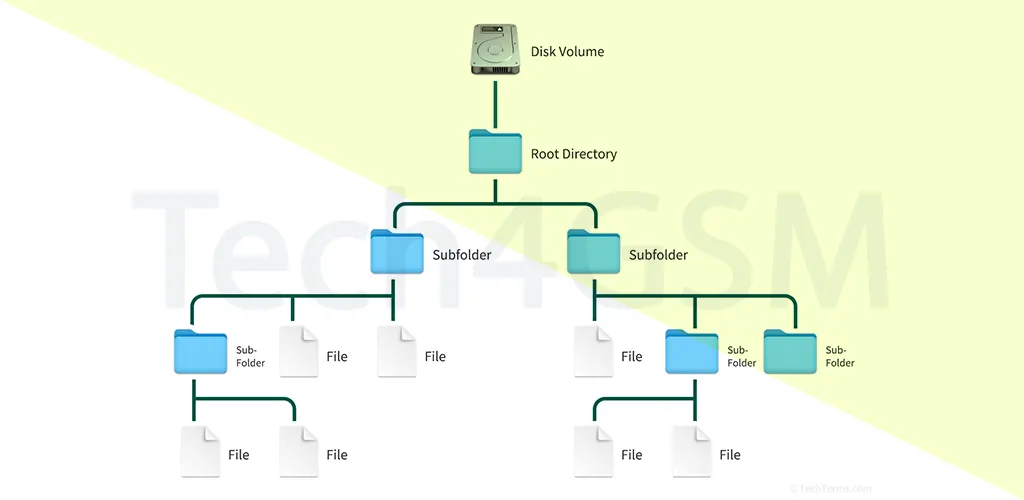
When you hear “Hierarchical File System” or “HFS,” it could refer to two things:
- The General Concept: A tree-like method of organizing files and folders (common in most operating systems).
- Apple’s HFS: A specific file system used in Macintosh computers from 1985 until the late 1990s.
What is a File System?
Imagine a library without shelves, labels, or a catalog. Chaos, right? A file system is like a librarian for your computer. It:
- Organizes Data: Sorts files into folders for easy access.
- Tracks Changes: Logs file creation, edits, and deletions.
- Manages Storage: Allocates space efficiently on disks.
Without file systems, your computer wouldn’t know where files are stored or how to retrieve them. From Windows’ NTFS to Linux’s ext4, each system has unique rules. For Apple, HFS was the game-changer in 1985.
Apple’s HFS: A Revolution in File Management
In 1985, Apple replaced the Macintosh File System (MFS) with HFS (Hierarchical File System). Designed by engineers Patrick Dirks and Bill Bruffey, HFS introduced a tree-like structure inspired by Apple’s earlier SOS (Sophisticated Operating System) from the Apple III.
Why HFS Mattered
- Supported Hard Drives: Early Macs used floppy disks (MFS), but HFS embraced larger hard drives.
- Hierarchical Folders: Users could nest folders inside folders—a basic yet transformative feature.
- Faster Access: Improved data retrieval speeds compared to MFS.
Fun Fact: HFS wasn’t just for Macs! It influenced file systems on Apple IIe and Lisa computers too.
Technical Features of HFS
Apple’s HFS had distinct technical traits, some revolutionary and others limiting by today’s standards:
1. Block Size and Limitations
- 512-Byte Blocks: Data was split into small blocks, optimizing storage but limiting scalability.
- 16-Bit Addressing: Allowed only 65,535 blocks (max 32 MB per volume). Later updates expanded this.
2. Boot Blocks and Master Directory Block
- Boot Blocks (0 and 1): Held startup instructions for the Mac.
- Master Directory Block (MDB): Located in Block 2, it stored volume details (e.g., file count, free space).
3. Catalog File: The Tree’s Blueprint
- A single file tracked the hierarchy—folders, subfolders, and file locations. Think of it as the system’s “map.”
4. Resource Forks
- Unique to Mac OS, files had two parts:
- Data Fork: Actual content (e.g., text in a document).
- Resource Fork: Metadata (e.g., fonts, icons).
Drawbacks of HFS: Why Apple Moved On
While revolutionary, HFS had flaws that became glaring as tech advanced:
1. File and Volume Size Limits
- Max File Size: 2 GB (problematic for videos or databases).
- Volume Limit: Initially 2 GB, later raised to 4 GB with Mac OS 7.5—still too small for multimedia tasks.
2. File Count Cap
- 65,535 Files: HFS could only handle ~54k files per volume. Modern systems support millions.
3. Fragmentation Issues
- Frequent file edits caused fragmentation, slowing down performance.
4. No Native Journaling
- Crashes could corrupt data since HFS didn’t log changes before committing them.
By 1998, Apple introduced HFS+ (Extended HFS), supporting larger files, Unicode names, and journaling. Today, APFS (Apple File System) dominates, but HFS remains a critical piece of tech history.
HFS vs. Modern Hierarchical Systems
While Apple’s HFS is obsolete, the hierarchical structure thrives. Here’s why:
1. Intuitive Navigation
- Tree layouts mimic real-world organizing (e.g., a filing cabinet).
2. Scalability
- Modern systems like APFS or NTFS handle terabytes of data without breaking a sweat.
3. Metadata Advancements
- Features like tags (macOS) and cloud integration (iCloud) build on HFS’s resource forks.
FAQs: Your HFS Questions Answered
Q1: Can I still use HFS on a modern Mac?
- Yes, but read-only. macOS 10.13 (2017) onward uses APFS by default. Use external tools for write access.
Q2: What replaced HFS?
- HFS+ (1998): Added larger files, Unicode, and journaling.
- APFS (2017): Optimized for SSDs, encryption, and snapshots.
Q3: Why did Apple stick with hierarchical systems?
- User Familiarity: Folders are easy to grasp.
- Flexibility: Trees adapt to complex workflows (e.g., coding projects).
Q4: Is HFS secure?
- No by modern standards. Lacks encryption and permissions in APFS.
Conclusion: HFS’s Legacy in 2025
Though retired, HFS laid the groundwork for macOS’s file management. Its hierarchical principles remain timeless, proving that good design never truly dies.