Introduction
KBPS stands for Kilo Bytes Per Second, a unit used to measure data transfer speeds. It indicates how much data (in kilobytes) is transmitted or received every second. For example, if your internet speed is 500 KBPS, it means 500 kilobytes of data are moving through your network each second.
But wait—there’s confusion between bits and bytes! Let’s break it down:
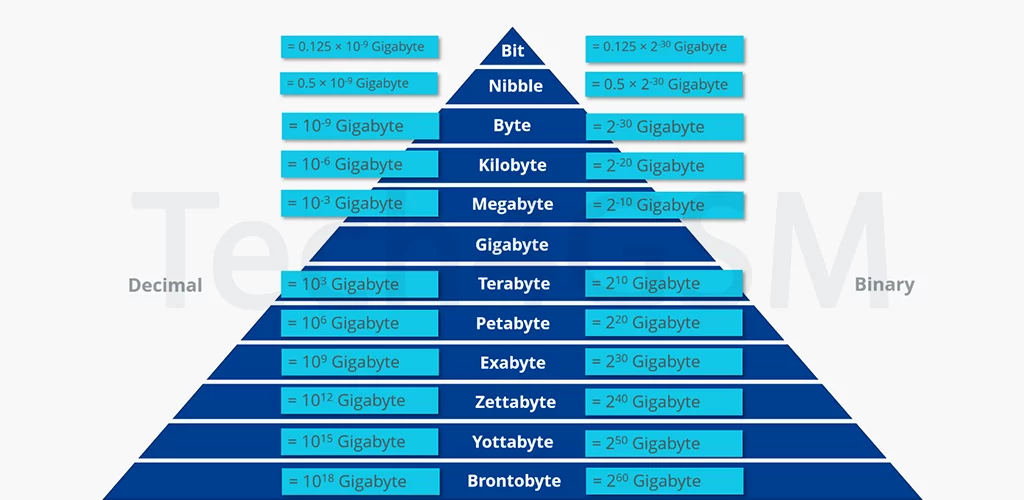
- 1 Byte = 8 Bits.
- 1 Kilobyte (KB) = 1,000 Bytes.
- 1 Kilobit (Kb) = 1,000 Bits.
So, KBPS (Kilobytes Per Second) is 8 times larger than Kbps (Kilobits Per Second). If your internet plan advertises 100 Kbps, that’s just 12.5 KBPS. Always check the unit to avoid confusion!
Why KBPS Matters in 2025
In 2025, data demands will skyrocket with advancements in 4K streaming, VR gaming, and smart home devices. Understanding KBPS helps you:
- Choose the right internet plan.
- Troubleshoot slow connections.
- Optimize downloads/uploads.
Bits vs. Bytes: The Key Difference
A kilobit (Kb) measures data transmission speed, commonly used by ISPs (Internet Service Providers). For instance, “100 Mbps” means 100 megabits per second.
- 1 Kbps = 1,000 bits per second.
- 1 Mbps = 1,000,000 bits per second.
Meanwhile, KBPS (Kilobytes Per Second) is used for file sizes and download speeds.
- 1 KBPS = 1,000 bytes per second.
- 1 MBPS = 1,000,000 bytes per second.
Pro Tip: Divide Kbps by 8 to get KBPS.
How KBPS Affects Your Daily Life
1. Streaming Videos
- SD Quality: 1-3 MBPS (125–375 KBPS).
- HD Netflix: 5 MBPS (625 KBPS).
- 4K Streaming: 25 MBPS (3,125 KBPS).
2. Online Gaming
- Low Latency: Requires 3–6 MBPS (375–750 KBPS).
- Cloud Gaming (e.g., Xbox Cloud): 20+ MBPS (2,500+ KBPS).
3. Video Calls
- Zoom/Teams: 1.5–3 MBPS (187–375 KBPS).
Factors That Impact KBPS
- Network Type: Fiber offers 1,000+ MBPS, while 4G averages 20–50 MBPS.
- Device Limitations: Old routers cap speeds.
- Congestion: Too many users slow down bandwidth.
- Distance from Server: Far servers reduce speeds.
For mobile data tips, visit tech4gsm.com.
How to Measure KBPS
Use free tools like Speedtest.net or tech4gsm.com/speed-test.
- Download Speed: Data received (e.g., 50 MBPS = 6,250 KBPS).
- Upload Speed: Data sent (e.g., 10 MBPS = 1,250 KBPS).
Boost Your KBPS: 5 Easy Hacks
- Upgrade Your Router: Use Wi-Fi 6 for faster speeds.
- Use Ethernet: Avoid wireless interference.
- Limit Background Apps: Stop automatic updates.
- Restart Devices: Fixes temporary glitches.
Future of KBPS: 2025 Predictions
By 2025, expect:
- 5G Dominance: Speeds up to 10,000 MBPS (1,250,000 KBPS).
- AI-Optimized Networks: Smart bandwidth allocation.
- Satellite Internet: Global high-speed coverage.
FAQ: KBPS Explained
Q1. Is KBPS the same as internet speed?
Yes! KBPS measures how fast data travels. Higher KBPS = faster downloads.
Q2. Why is my actual KBPS lower than advertised?
Due to network congestion, hardware limits, or distance from the ISP server.
Q3. How much KBPS do I need for YouTube?
- 720p: 2,500+ KBPS.
- 1080p: 5,000+ KBPS.
Q4. Can I convert KBPS to Mbps?
Yes! Multiply KBPS by 8. For example, 1,000 KBPS = 8,000 Kbps = 8 Mbps.
Q5. What’s the future of KBPS in 2025?
Speeds will rise with 5G and fiber tech.
Final Thoughts
Understanding KBPS empowers you to make smarter tech choices. Whether streaming, gaming, or working, optimizing your KBPS ensures seamless connectivity.