Introduction
In the world of computer networking, the OSI (Open System Interconnection) model is a game-changer. It breaks down complex communication processes into seven manageable layers, making it easier to understand how data travels between devices. Whether you’re a tech enthusiast or a professional, this guide will explain each layer in simple terms, with real-life examples and a focus on tech4gsm.com for deeper insights. Let’s dive in!
1. Physical Layer: The “Hardware Highway”
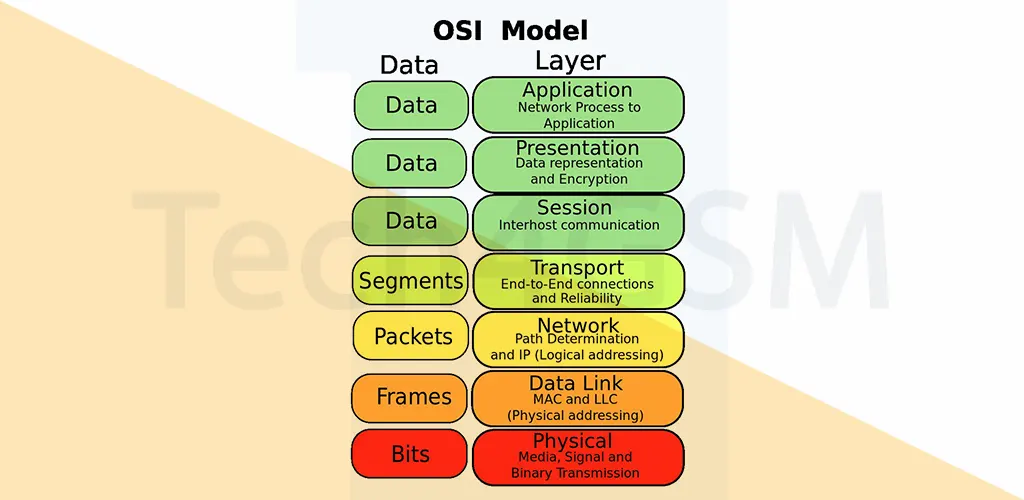
The Physical Layer is where the magic of raw data transfer begins. Imagine it as the cables, switches, and Wi-Fi routers that physically connect devices. This layer converts data into a bitstream (a series of 1s and 0s) and ensures both devices agree on a “signal language” to distinguish 1s from 0s. For example, a USB cable transferring files between your phone and laptop operates at this layer.
2. Data Link Layer: The “Local Traffic Controller”
This layer handles communication between devices on the same network, like your home Wi-Fi. It breaks data from the Network Layer into smaller chunks called frames. Think of it as a postman sorting letters for delivery within a neighborhood. It also manages flow control (preventing data overload) and error checks to fix corrupted frames.
3. Network Layer: The “Global Navigator”
When data needs to travel between different networks (e.g., sending an email from New York to Tokyo), the Network Layer steps in. It splits data into packets, adds IP addresses, and finds the fastest route (a process called routing). Routers, like those from tech4gsm.com, work here to guide packets across the internet.
4. Transport Layer: The “Reliable Courier”
Layer 4 ensures seamless end-to-end communication. It splits data into segments, controls transmission speed (flow control), and checks for errors (error control). For instance, when streaming a video, this layer ensures no buffering by balancing data speed between your device and the server.
5. Session Layer: The “Conversation Manager”
This layer opens, maintains, and closes communication “sessions” between devices. Imagine a video call: the Session Layer keeps the call active until you hang up. It also uses checkpoints to resume interrupted transfers. For example, if a 100MB download stops at 52MB, it restarts from 50MB instead of zero—saving time and data!
6. Presentation Layer: The “Translator & Protector”
Layer 6 prepares data for the application layer. It translates data formats (like JPEG to PNG), encrypts sensitive info (e.g., banking details), and compresses files for faster transfer. Ever noticed “HTTPS” in a URL? That’s this layer encrypting your data!
7. Application Layer: The “User-Friendly Face”
The topmost layer interacts directly with you. Apps like web browsers or email clients use protocols such as HTTP (for websites) or SMTP (for emails) here. While apps like Chrome aren’t part of this layer, they rely on its rules to display content you understand.
FAQs About the OSI Model
1. Why is the OSI model important in 2025?
The OSI model remains a cornerstone for troubleshooting networks and developing new tech. With advancements in IoT and 5G, understanding these layers helps optimize connectivity.
2. How do layers communicate with each other?
Each layer adds its own “header” to data packets, which the receiving device decodes step-by-step, like unwrapping a gift box layer by layer.
3. Is the OSI model used in real-life networks?
While modern networks often use the simpler TCP/IP model, the OSI framework is still widely taught and used for diagnosing issues.
4. What’s the difference between TCP/IP and OSI?
TCP/IP combines OSI’s top three layers into one “Application Layer.” For a detailed comparison, visit tech4gsm.com.
5. Which OSI layer is most important?
All layers matter! For example, without the Physical Layer, there’d be no internet; without the Application Layer, you couldn’t browse websites.
Final Thoughts
The OSI model demystifies how data zips across the globe. Whether you’re setting up a home network or exploring tech4gsm.com for cutting-edge gadgets, this knowledge empowers you to make smarter tech decisions. Stay curious, and happy networking in 2025! 🌐