Introduction
In the fast-paced world of computing, SRAM (Static Random Access Memory) plays a critical role. This article breaks down what SRAM is, its history, how it works, and why it’s essential in devices like your smartphone, laptop, or gaming console. Let’s explore its unique features, pros, cons, and real-world uses—all in simple terms!
What is SRAM?
SRAM stands for Static Random Access Memory. It’s a type of volatile memory (loses data when powered off) made from semiconductors. Unlike its cousin DRAM (Dynamic RAM), SRAM uses flip-flops—tiny circuits built with 4-6 transistors—to store data. Once a bit (0 or 1) is saved, it stays put until changed or the power cuts off.
Key Fact: SRAM is super-fast and often acts as cache memory in CPUs, helping processors retrieve data quickly.
A Quick History of SRAM
- 1964: Engineer John Schmidt invented SRAM at Fairchild Semiconductors. The first SRAM chip held 64 bits of data using p-channel MOS technology.
- 1969: Intel launched the 256-bit Intel 1101 SRAM, built with Schottky TTL logic.
- Today: Modern SRAMs are integrated directly into CPUs, making devices faster and more efficient.
Key Characteristics of SRAM
- No Refresh Needed: SRAM holds data statically—no constant power refreshes (unlike DRAM).
- Random Access: Data can be read/written from any location instantly.
- Flip-Flop Design: Uses 4-6 transistors per bit, creating stable storage.
- Speed King: Ideal for cache memory in CPUs and GPUs due to rapid access times.
Advantages of SRAM
- ⚡ Lightning-Fast: Reads/writes data quicker than DRAM.
- 🔄 No Refresh Cycles: Saves power and simplifies design.
- 🎯 Random Access: Grab data from anywhere without delay.
- 💡 Low Power Use: More energy-efficient than DRAM for frequent tasks.
Disadvantages of SRAM
- 💸 Expensive: Costs more due to complex transistor designs.
- 🔋 Volatile: Data vanishes if power drops.
- 📦 Bulky Design: Takes up more space per bit than DRAM.
- 🧩 Low Storage Capacity: Not ideal for high-capacity needs like RAM in smartphones.
Where is SRAM Used?
- CPU Cache: L1, L2, and L3 caches in processors (e.g., Intel Core or AMD Ryzen).
- GPU Cache: Helps render graphics smoothly in gaming consoles.
- Microcontrollers: Small memory banks in devices like smartwatches.
- Networking Gear: Routers and switches use SRAM for speedy data routing.
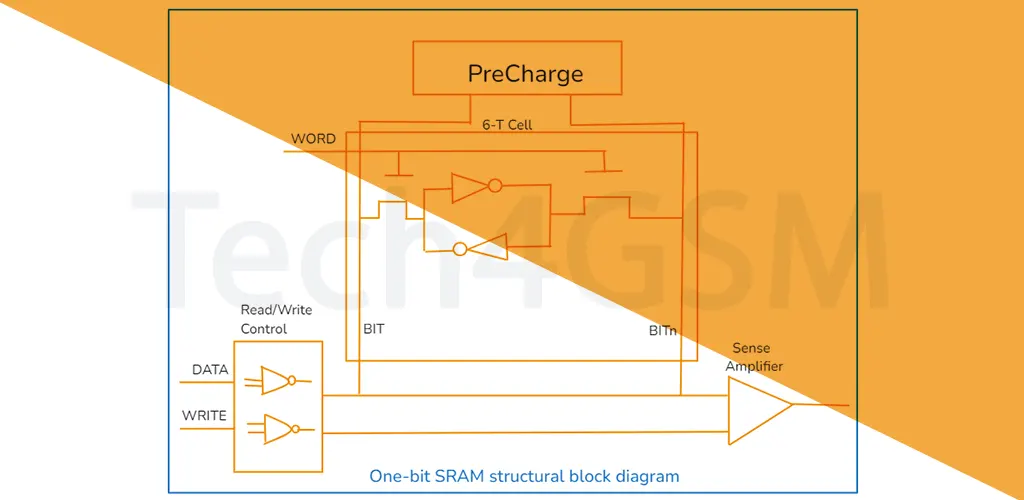
How Does a 1-Bit SRAM Cell Work?
A single SRAM bit uses 6 transistors:
- 4 Transistors: Form cross-coupled inverters (a latch) to store 0 or 1.
- 2 Transistors: Act as “gates” controlled by a word line to read/write data.
- Bit Lines (BL/BL’): Carry data in/out of the cell.
Writing Data: Set the bit lines to 0/1 and activate the word line.
Reading Data: Word line opens the gates, letting the stored bit flow out.
Conclusion: SRAM in 2025 and Beyond
As we step into 2025, SRAM remains a cornerstone of computing. Its speed and efficiency make it irreplaceable for cache memory and high-performance tasks. While it’s costly and not ideal for bulk storage, advancements in semiconductor tech promise smaller, faster SRAM designs.
FAQs About SRAM
Q1: How is SRAM different from DRAM?
A: SRAM uses flip-flops and doesn’t need refreshing, making it faster but pricier. DRAM is cheaper but slower and requires constant power refreshes.
Q2: Why is SRAM used in CPU cache?
A: Its blazing speed helps CPUs access frequently used data instantly, boosting performance.
Q3: Can SRAM retain data without power?
A: No—it’s volatile. Data disappears when power is cut.
Q4: What’s the future of SRAM?
A: Expect smaller, denser cells and integration into AI chips and IoT devices.
Q5: Why is SRAM expensive?
A: Each bit needs 6 transistors, unlike DRAM’s 1 transistor + capacitor. This complexity raises costs.
SRAM might not be perfect, but its speed keeps our devices zippy. From gaming to AI, this tiny memory giant is here to stay! 🚀