
7 Amazing Extensions to Have in Mozilla Firefox
Mozilla Firefox is an incredible browser that has long been a favorite for those seeking privacy, speed, and customization. Despite its decreasing market share in recent years, Firefox remains a highly capable browser with a loyal user base. Unlike many other browsers, it prioritizes user privacy and open-source development, making it a trustworthy choice for many.
Firefox’s vast library of extensions is one of its standout features, enabling users to add functionality, boost security, and improve their browsing experience. Below are seven exceptional Firefox extensions you should consider adding to your browser.
1. uBlock Origin: Your Ultimate Content Blocker
If there’s one extension every Firefox user should have, it’s uBlock Origin. This extension isn’t just an ad blocker; it’s a comprehensive tool to improve your browsing safety and speed.
Features of uBlock Origin:
- Blocks ads and trackers: Say goodbye to annoying pop-ups, banners, and intrusive ads.
- Blocks coin miners: Protects your device from hidden cryptocurrency miners embedded in shady websites.
- Stops prefetching: Prevents websites from preloading content without your consent.
- Customizable threat lists: Includes preloaded options like EasyList, EasyPrivacy, and more for advanced protection.
For those concerned about online safety, uBlock Origin is a must-have. It reduces risks by stopping malicious content before it reaches your system.
2. Privacy Badger: Intelligent Tracker Blocker
Privacy Badger is another fantastic extension that takes your online security a step further. Unlike other blockers that rely on predefined lists, Privacy Badger learns as you browse.
What Makes Privacy Badger Unique?
- Smart learning: Identifies and blocks trackers based on their behavior.
- Automatic opt-out: Prevents companies from sharing or selling your data without consent.
- Link tracking removal: Strips tracking information from links you click on platforms like Google and Facebook.
Used alongside uBlock Origin, Privacy Badger creates a robust barrier against intrusive tracking and ads.
3. Bitwarden Password Manager: Secure Your Digital Life
In the modern age, managing passwords is essential, and Bitwarden excels in this area. This open-source password manager offers a Firefox extension that simplifies online security.
Benefits of Bitwarden Extension:
- Secure storage: Save and autofill your passwords directly from the browser.
- Password generator: Create complex, unique passwords for each account effortlessly.
- Sync across devices: Access your passwords seamlessly from desktop, mobile, and web.
By using Bitwarden, you eliminate the risks of weak passwords and ensure your accounts are safe from breaches.
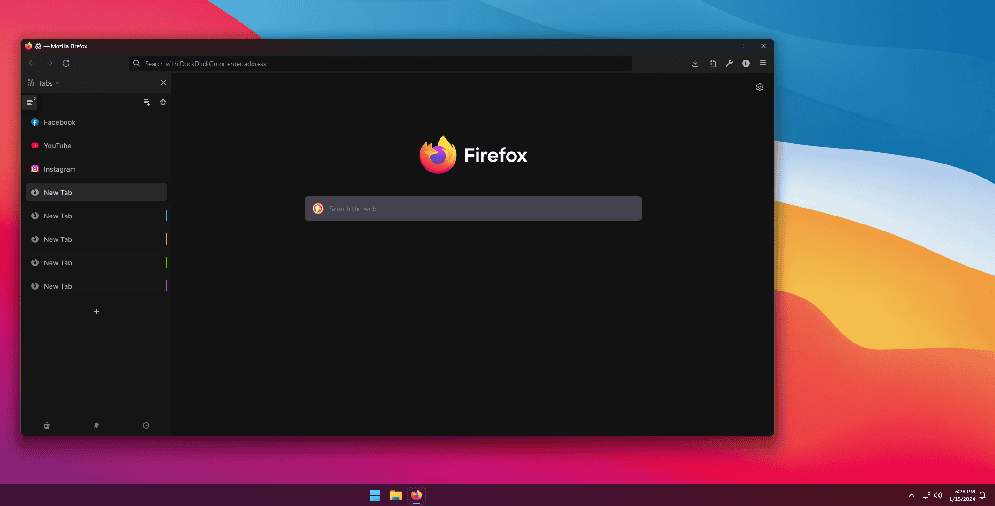
4. Sideberry: Take Tab Management to the Next Level
If you find Firefox’s default tab management lacking, Sideberry is the perfect solution. It adds an intuitive sidebar that transforms how you handle tabs.
Why Sideberry is a Game-Changer:
- Organized views: Display tabs in a tree or list format for better navigation.
- Group tabs: Arrange related tabs into folders to streamline multitasking.
- Resource management: Automatically unload inactive tabs to save memory.
- Customizable appearance: Change colors and labels to suit your preferences.
Sideberry is ideal for users who frequently juggle multiple tabs and want a cleaner, more efficient workflow.
5. ClearURLs: Remove Unnecessary Tracking Links
Sharing links often results in long, cluttered URLs filled with tracking data. ClearURLs is an essential extension that cleans up these links for a simpler and more private experience.
How ClearURLs Enhances Browsing:
- Removes tracking elements: Automatically strips unnecessary characters from URLs.
- Improves privacy: Prevents third parties from collecting data through link trackers.
- Cleaner sharing: Makes links shorter and easier to share.
This lightweight tool ensures that your browsing and sharing activities remain private.
6. Dark Reader: Night Mode for Every Website
For those who browse late at night, Dark Reader is a lifesaver. It applies a dark theme to every website, reducing eye strain and making late-night browsing comfortable.
Customizations Offered by Dark Reader:
- Adjustable settings: Tweak brightness, contrast, and color schemes to your liking.
- Site-specific control: Enable or disable dark mode for individual websites.
- Privacy-focused: As an open-source project, Dark Reader respects your data.
With Dark Reader, your browsing experience becomes both visually appealing and easier on the eyes.

7. ScrollAnywhere: Effortless Scrolling Experience
ScrollAnywhere brings the convenience of mobile scrolling to your desktop. This simple yet powerful tool lets you scroll by clicking and dragging anywhere on the page.
Why ScrollAnywhere is Worth Installing:
- Mobile-like scrolling: Mimics the smooth motion of touchscreens.
- Improved navigation: Makes reading long articles or documents more intuitive.
- Custom settings: Adjust sensitivity and scrolling speed to suit your preferences.
This extension is perfect for those who prefer fluid and flexible scrolling.
Conclusion: Enhance Your Firefox Experience
Mozilla Firefox remains one of the best browsers, and with these seven extensions, you can take your browsing experience to new heights. Whether you’re looking to block ads, boost privacy, manage passwords, or enhance usability, these tools have you covered.