Introduction
JPEG stands for Joint Photographic Experts Group. Contrary to popular belief, JPEG is not just a file format—it’s a compression technique used to reduce the size of digital images. While many confuse it with formats like JPG, PNG, or GIF, JPEG is actually the method behind compressing images into formats such as PDF, EPS, or TIFF.
Key Clarifications:
- JPEG vs. JPG: They’re the same! The difference? Older Windows systems required 3-letter extensions, so “.jpg” was used instead of “.jpeg.
- Myth Buster: JPEG isn’t a format. It’s the algorithm that powers image compression in formats like JPG.
How Does JPEG Compression Work?
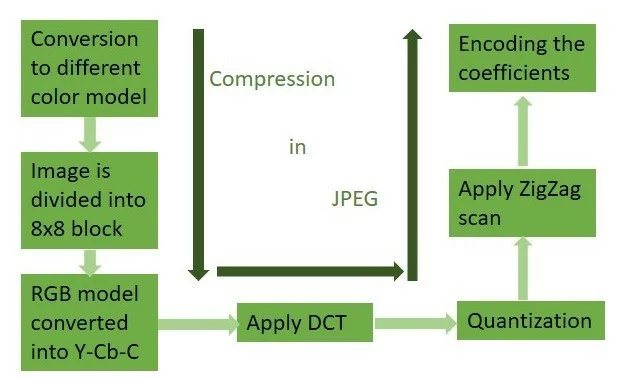
JPEG uses lossy compression, meaning it removes details invisible to the human eye to shrink file sizes. Here’s a simple breakdown:
Step 1: Color Space Conversion
- Images start in RGB (Red, Green, Blue).
- JPEG converts this to Y-Cb-Cr, separating brightness (Y) from color data (Cb and Cr). This mimics how human eyes prioritize brightness over color.
Step 2: Dividing into Blocks
- The image is split into 8×8 pixel blocks. Each block is processed individually.
Step 3: Discrete Cosine Transform (DCT)
- DCT converts each block from the spatial domain (pixel values) to the frequency domain (wave patterns).
- Formula Simplified: DCT identifies repetitive patterns and discards high-frequency data (like tiny details) that our eyes don’t notice.
Step 4: Quantization
- This step reduces precision of frequency data. Think of it as rounding numbers—smaller file size, slight quality loss.
Step 5: Zigzag Scanning & Encoding
- Data is rearranged using zigzag scanning to group similar frequencies.
- Finally, Huffman coding and Run-Length Encoding compress the data further.
Why This Matters?
By focusing on human vision limits, JPEG achieves small file sizes without noticeable quality loss—perfect for sharing photos online!
History of JPEG
- 1982: ISO formed a group to study image transmission.
- 1985: CCITT began researching compression.
- 1987: The two groups merged, forming the Joint Photographic Experts Group (JPEG).
- 1992: The first JPEG standard was released.
- 1994: Final updates added support for 24-bit color and 16 million colors.
2025 Update: As we move into 2025, JPEG remains dominant despite newer formats like WebP or AVIF. Its universal compatibility keeps it relevant.
Characteristics of JPEG
- Lossy Compression: Sacrifices some data for smaller sizes.
- Color Averaging: Merges similar hues to reduce complexity.
- Adaptive Compression: Automatically selects the best compression method.
- Multi-Part Standard:
- Part 1: Core coding for photos.
- Part 2: Compliance testing rules.
- Part 3: Extensions like SPIFF.
- Part 4: Registry for JPEG extensions.
- Part 5: JFIF file format (the .jpg files we use).
Advantages of JPEG
- ✅ Small File Sizes: Save storage and speed up web loading.
- ✅ 16 Million Colors: Ideal for photos with rich gradients.
- ✅ Universal Compatibility: Works on all devices, apps, and browsers.
- ✅ Adjustable Quality: Choose between size and clarity (e.g., 60% quality for web use).
- ✅ Direct Printing: No edits needed for print-ready images.
Use Cases:
- Social media posts.
- Digital photography.
- Web graphics (banners, product images).
Disadvantages of JPEG
- ❌ Quality Loss: Repeated editing/saving degrades images.
- ❌ Poor for Text/Logos: Blurs sharp edges and text.
- ❌ No Transparency: Transparent areas turn white.
- ❌ Limited to Still Images: No support for animations.
Pro Tip: Use PNG for logos/text and GIF or WebP for animations.
JPEG in 2025: What’s Next?
While newer formats like AVIF offer better compression, JPEG’s legacy ensures it won’t disappear. Innovations like JPEG XL aim to improve compression without losing compatibility.
FAQs
1. Is JPEG the same as JPG?
Yes! The only difference is the file extension name due to older Windows limitations.
2. What’s the full form of JPG and PNG?
- JPG: Joint Photographic Experts Group.
- PNG: Portable Network Graphics.
3. Can JPEGs be high quality?
Absolutely! At 100% quality, JPEGs retain most details but have larger file sizes.
4. Why does my JPEG look blurry?
Over-compression or repeated editing causes pixelation. Always keep originals.
5. Is JPEG free to use?
Yes! No licenses or fees—use it freely for personal or commercial projects.
Conclusion
JPEG revolutionized digital imagery by balancing quality and file size. Whether you’re sharing memories or building a website, understanding JPEG helps you optimize visuals effectively.
Final Thought: While new formats emerge, JPEG’s simplicity and compatibility keep it a timeless choice. Embrace it wisely!