Introduction
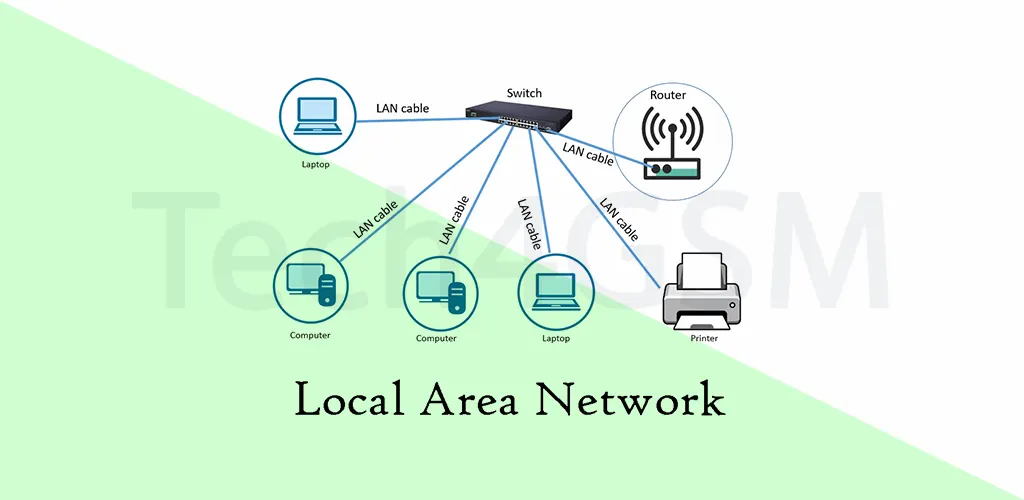
A Local Area Network (LAN) is a network that connects devices within a limited geographic area, such as a home, office, or school. Think of it as a digital “room” where computers, printers, and smartphones “talk” to each other. For example, your home WiFi, where your laptop streams a movie while your phone prints a document via a wireless printer, is a LAN. Small businesses also rely on LANs to share files and resources securely.
Did You Know?
The first LANs appeared in the 1970s, using bulky cables and slow speeds. Today, LANs leverage lightning-fast WiFi 6 and fiber optics, revolutionizing how we connect!
How Big Can a LAN Get? LAN vs. WAN vs. MAN
While LANs are typically confined to a single building, they can stretch across larger areas—like a campus. However, once a network spans multiple buildings or cities, it’s classified as:
- Wide Area Network (WAN): Connects LANs across countries (e.g., a corporate network linking offices in New York and Tokyo).
- Metropolitan Area Network (MAN): Covers a city (e.g., a university network across a metro area).
Pro Tip: Need to set up a multi-building network? Use WAN/MAN solutions for seamless connectivity.
How Do LANs Work? A Step-by-Step Breakdown
- Central Hub (Router): All devices connect to a router, which directs traffic between them and the internet.
- Connection Types:
- Ethernet: Uses cables for stable, high-speed links (ideal for gaming PCs or servers).
- WiFi: Wireless connectivity for mobility (perfect for smartphones and tablets).
- Data Delivery: Network switches (in larger LANs) ensure data packets reach the right device efficiently.
Example: In an office, a switch sends your print job directly to the printer, avoiding delays.
Essential LAN Equipment for 2025
- Basic Setup:
- Router: Manages traffic and connects to the internet.
- Ethernet Cables/WiFi Hotspot: For device connections.
- Advanced Needs:
- Network Switches: Boost efficiency in large spaces (e.g., office buildings).
- Servers: Store shared files and applications.
No Internet? Use a switch for internal data sharing.
LANs Without Internet: A Blast from the Past
Before the internet, LANs thrived in businesses for tasks like inventory management. Today, offline LANs still exist in secure environments (e.g., research labs). They use modern IP protocols, ensuring compatibility if you later add internet.
Fun Fact: Early LANs used coaxial cables, resembling TV antenna wires!
Virtual LANs (VLANs): One Network, Multiple Segments
Imagine splitting a physical LAN into two isolated networks without extra hardware. VLANs do this via software, enhancing security and management.
Use Cases:
- Office Separation: HR and Finance departments on separate VLANs.
- Guest Networks: Isolate visitors from main systems.
VLAN vs. Subnet: VLANs operate at the data link layer, while subnets work at the IP layer. Both improve efficiency but serve different purposes.
LAN vs. WAN: What’s the Difference?
| Aspect | LAN | WAN |
|---|---|---|
| Scope | Single building/campus | Global (e.g., multinational corp) |
| Speed | Faster (up to 10 Gbps) | Slower (depends on infrastructure) |
| Cost | Lower | Higher |
LANs and the Internet: The Bigger Picture
LANs link to the internet via Autonomous Systems (AS), like ISPs. For instance, your home LAN connects to your ISP’s AS, which connects to global networks. This hierarchy lets a laptop in Paris chat with a server in Sydney!
Key Player: ISPs (e.g., Comcast, Verizon) act as gateways between your LAN and the world.
Securing Your LAN in 2025: Cloudflare Magic Transit
LANs face threats like DDoS attacks, which overwhelm networks. Cloudflare Magic Transit protects on-premise and hybrid networks by:
- Blocking malicious traffic.
- Accelerating legitimate data flow.
Case Study: A 2025 upgrade saw XYZ Corp reduce downtime by 70% using Magic Transit.
FAQs: Your LAN Questions Answered
Q1: Can a LAN work without the internet?
Yes! LANs can share files and printers offline.
Q2: What’s the maximum LAN size?
Technically, under 1 km. Beyond that, consider a WAN/MAN.
Q3: How do I secure my home LAN?
- Use WPA3 encryption.
- Change default router passwords.
- Enable a firewall.
Q4: Is WiFi a LAN?
Yes! Wireless LANs (WLANs) use WiFi for connections.
Q5: What’s the future of LANs?
Expect AI-driven networks and IoT integration by 2025!
Final Thoughts
From smart homes to global enterprises, LANs remain the backbone of connectivity. By understanding their setup, security, and evolution, you’re ready to harness their power in 2025.