
How to Analyze PDFs with ChatGPT
Analyzing PDFs can be time-consuming, especially if the documents are lengthy and complex. ChatGPT simplifies this process with advanced AI capabilities. Whether you’re reviewing research papers, legal documents, or technical data, ChatGPT can extract key information, summarize it, and provide insights with ease. Let’s explore how you can leverage ChatGPT for PDF analysis, step by step.
Understanding ChatGPT’s Ability to Analyze PDFs
ChatGPT uses natural language processing (NLP) and computer vision technologies to analyze PDFs effectively. Here’s a breakdown of its capabilities:
1. Text Extraction
- Optical Character Recognition (OCR): ChatGPT can identify and extract text from PDFs, including those with embedded images or scanned pages.
- Editable and Searchable Data: Once extracted, the text becomes searchable, making it easy to find specific information.
2. Content Understanding
- Structural Analysis: ChatGPT identifies headings, paragraphs, tables, and images to understand the hierarchy of information.
- Context Recognition: It ensures that the extracted content is analyzed in context, making summaries and insights more accurate.
3. Summarization
- Condensed Information: ChatGPT provides concise summaries of lengthy documents, helping users grasp the main points quickly.
- Useful for Research and Legal Texts: Summaries are particularly valuable for time-sensitive reviews.
4. In-Depth Analysis
- Trend Identification: The AI can recognize patterns or trends across sections of a document.
- Specific Data Extraction: It extracts precise details relevant to user queries, ideal for technical or academic studies.
5. Question-Answering
- Interactive Query Handling: You can ask ChatGPT questions about the content, and it will respond based on the document’s information.
6. User-Friendly Experience
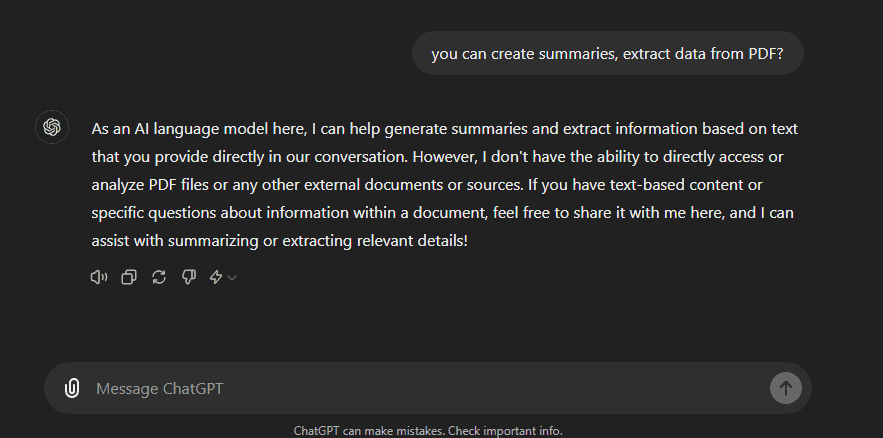
- Simple Upload Process: Upload your PDF, input a query, and let ChatGPT do the rest.
- Fast Results: The analysis is performed in moments, saving hours of manual work.
Why This Matters: ChatGPT’s PDF analysis tools reduce the effort and time needed to understand complex documents. By providing summaries and answering questions, it enables smarter, faster decision-making.
Step-by-Step Guide: How to Upload PDFs to ChatGPT
Step 1: Log into ChatGPT
- Open a web browser and visit ChatGPT.
- Click the “Sign In” button in the corner.
- Enter your credentials and access your ChatGPT dashboard.
Step 2: Attach the PDF
- In the ChatGPT chat window, locate the paperclip icon next to the input field.
- Click on it to open the file attachment menu.
- Select the source of your PDF (e.g., local drive, Google Drive, OneDrive).
- Choose the PDF file and click “Open” or “Select” to attach it.
Step 3: Enter Your Query
- After uploading the PDF, type your query in the input box.
- Example: “Summarize the key points of this document.”
- Click the submit button to start the analysis.
- ChatGPT will process the document and provide insights in seconds.
Tip: You can ask follow-up questions to clarify specific sections of the document.

Benefits of Using ChatGPT for PDF Analysis
1. Saves Time and Effort
- Efficiency: No need to manually sift through dozens of pages.
- Automation: ChatGPT handles complex documents quickly, giving you more time to focus on critical tasks.
2. Provides Accurate Summaries
- Highlighting Key Points: ChatGPT ensures you don’t miss crucial details.
- Error Reduction: Minimizes the risk of overlooking important information in lengthy texts.
3. Supports Various Applications
- Research Papers: Quickly understand the core findings.
- Legal Documents: Extract key clauses or summarize terms.
- Business Reports: Highlight trends and financial data.
4. Enhances Decision-Making
- Insightful Analysis: Use ChatGPT’s findings to make informed decisions.
- Data Extraction: Easily pull out relevant statistics or arguments.
Tips for Preparing PDFs for Better Results
Ensure Text Accessibility
- Readable Text: Avoid PDFs with poor-quality scans or handwritten notes.
- Use Accessibility Tools: Tools like Adobe Acrobat’s Accessibility Checker can help ensure your PDF is machine-readable.
Clean Up the Document
- Remove Clutter: Eliminate unnecessary headers, footers, and page numbers.
- Simplify Layouts: Complex designs may confuse ChatGPT, so streamline them.
Organize the Document
- Proper Headings: Use clear and descriptive headings to structure your document.
- Consistent Formatting: Keep fonts and styles uniform throughout the file.
Simplify Complex Data
- Tables and Graphs: Convert these into plain-text explanations where possible.
- Avoid Ambiguity: Clearly explain complex concepts for better understanding.
Things to Keep in Mind When Using ChatGPT
1. Be Mindful of Privacy
- Confidential Documents: Avoid uploading sensitive or private files without understanding the platform’s data policies.
2. Check for Accuracy
- Human Oversight: While ChatGPT is powerful, it’s not infallible. Always review its outputs for critical decisions.
3. Legal Implications
- Copyrighted Material: Ensure you have the right to analyze and use the PDF content with ChatGPT.
4. Upgrade for Better Results
- ChatGPT-4: For more advanced analysis, consider using the GPT-4 version. It offers enhanced capabilities compared to GPT-3.5.
Conclusion: Why Use ChatGPT for PDF Analysis?
ChatGPT revolutionizes the way we analyze PDFs. By automating text extraction, summarization, and in-depth analysis, it saves time and enhances productivity.
- For Students: Simplify research paper reviews.
- For Professionals: Quickly summarize contracts, reports, or technical documents.
- For Everyone: Get insights with minimal effort.
However, always verify critical information and consider upgrading to GPT-4 for better accuracy and features. By following the tips in this guide, you can maximize ChatGPT’s potential and streamline your document review process.