Introduction
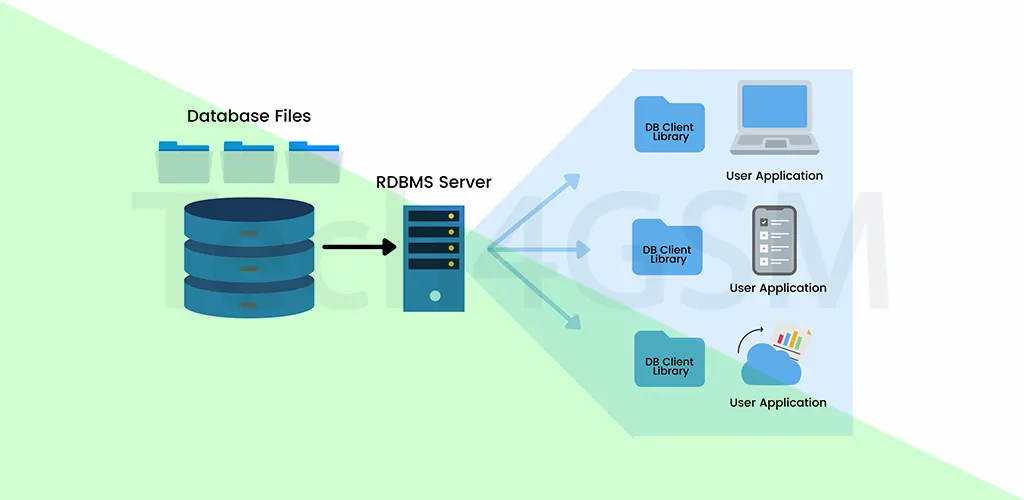
An RDBMS, or Relational Database Management System, is a powerful software suite designed to manage, organize, and retrieve structured data efficiently. Think of it as a digital librarian that stores information in neatly arranged tables, ensuring data is interconnected, secure, and easily accessible.
In simpler terms, an RDBMS acts as the backbone for storing data like customer details, product inventories, or financial records. It uses tables (rows and columns) to link related data points, making it easier to query and analyze information.
Most RDBMS tools, such as MySQL or Oracle Database, rely on SQL (Structured Query Language) for data operations. However, SQL isn’t mandatory—some systems use alternative methods to interact with data.
RDBMS vs. DBMS: Key Differences
While both systems manage data, here’s how they differ:
| Feature | DBMS | RDBMS |
|---|---|---|
| Data Model | Supports multiple models (hierarchical). | Uses a relational model with tables. |
| Language | No standard language. | Uses SQL for queries. |
| Users | Single-user access. | Multi-user support. |
| Hardware/Software Needs | Minimal requirements. | Requires robust infrastructure. |
| Data Volume | Handles small datasets. | Manages terabytes of data. |
| ACID Compliance | Not supported. | Ensures data consistency via ACID. |
| Normalization | Not applicable. | Reduces redundancy via normalization. |
Why Does This Matter?
Imagine a hospital using a DBMS to store patient files in folders (hierarchical structure). It works but becomes chaotic as data grows. An RDBMS, however, organizes records into tables (e.g., “Patients,” “Appointments”), linking them via unique IDs. This structure prevents duplication and speeds up searches—critical for saving lives!
Features of RDBMS: What Makes It Stand Out?
- CRUD Operations: Create, Read, Update, Delete data effortlessly.
- Data Security: Encryption, user authentication, and role-based access.
- ACID Compliance:
- Atomicity: Transactions are all-or-nothing (e.g., bank transfers).
- Consistency: Data remains valid post-transaction.
- Isolation: Concurrent transactions don’t interfere.
- Durability: Data survives system crashes.
- Scalability: Handle growing data with horizontal/vertical scaling.
- Backup & Recovery: Automated tools prevent data loss.
For instance, tech4gsm.com might use these features to protect customer payment details while scaling its product database.
How Does an RDBMS Work?
Let’s break it down:
- Tables & Keys:
- Primary Key: A unique ID for each table entry (e.g., Student ID).
- Foreign Key: Links two tables (e.g., linking “Students” to “Courses”).
- Constraints:
- Not Null: Mandatory fields (e.g., email addresses).
- Check: Validates data (e.g., age must be > 18).
- SQL Queries: Fetch data using commands like
SELECT * FROM Customers WHERE country='USA';.
Example: An airline uses an RDBMS to store passenger details (table 1) and flight bookings (table 2). The “Booking ID” foreign key connects both tables, ensuring smooth check-ins.
Advantages of RDBMS
- Data Accuracy: No duplicates, thanks to normalization.
- Flexibility: Modify tables without disrupting existing data.
- Multi-User Access: Teams collaborate in real-time.
- Disaster Recovery: Backups restore data during outages.
Case Study: A university uses an RDBMS to manage 50,000 student records, enabling instant access to grades and course registrations.
Disadvantages of RDBMS
- Cost: Licensing fees for software like Oracle can be high.
- Complex Setup: Migrating legacy data requires expertise.
- Limited to Structured Data: Struggles with images/videos.
Uses of RDBMS in 2025
- E-Commerce: Track orders, inventory, and customer behavior.
- Healthcare: Manage patient records and lab results securely.
- Banking: Process millions of transactions daily with ACID compliance.
- IoT: Store sensor data from smart devices.
Popular RDBMS Examples
- MySQL: Open-source, ideal for startups.
- Oracle Database: Enterprise-grade with advanced features.
- Microsoft SQL Server: Integrates seamlessly with Azure Cloud.
- IBM Db2: Supports hybrid (SQL + NoSQL) data.
History of RDBMS
The journey began in the 1970s when IBM’s E.F. Codd proposed the relational model. By the 1980s, systems like Oracle and SQL Server dominated businesses. Today, cloud-based RDBMS like Amazon Aurora lead innovation, blending scalability with traditional SQL strengths.
FAQs About RDBMS
Q1: Can an RDBMS handle big data?
Yes! Modern RDBMS tools scale using distributed architectures and cloud integration.
Q2: Is NoSQL replacing RDBMS?
NoSQL handles unstructured data, but RDBMS remains king for structured, transactional data.
Q3: How does tech4gsm.com use RDBMS?
It likely manages product listings, user accounts, and order histories securely.
Q4: What’s the future of RDBMS?
In 2025, expect AI-driven optimization and deeper cloud integration for faster analytics.
Conclusion
RDBMS continues to evolve, offering unmatched reliability for structured data management. Whether you’re a developer, business owner, or tech enthusiast, understanding RDBMS is crucial in our data-driven world.