Introduction
In the fast-paced world of computing, Direct Memory Access (DMA) stands as a cornerstone of efficiency. By enabling peripherals to communicate directly with a system’s RAM without CPU intervention, DMA revolutionizes how data transfers occur. Let’s dive into its workings, types, benefits, and more—all explained in simple terms!
What is Direct Memory Access (DMA)?
DMA is a hardware feature that allows devices like hard drives, network cards, or graphics cards to transfer data directly to/from memory. This bypasses the CPU, freeing it to handle critical tasks while reducing latency and boosting speed.
Key Idea:
- No CPU Middleman: Devices interact with memory independently.
- Faster Transfers: Large data blocks move swiftly.
- Efficiency: CPU focuses on complex computations.
How Does DMA Work?
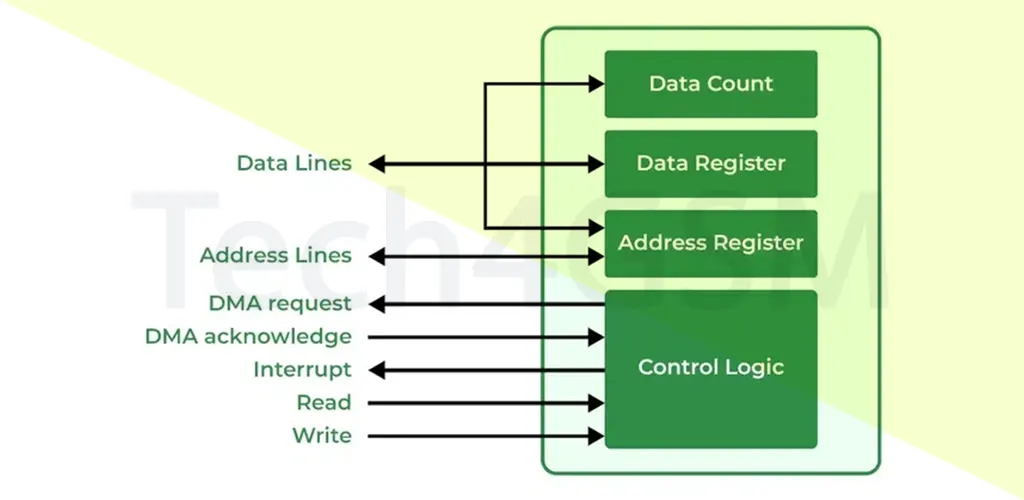
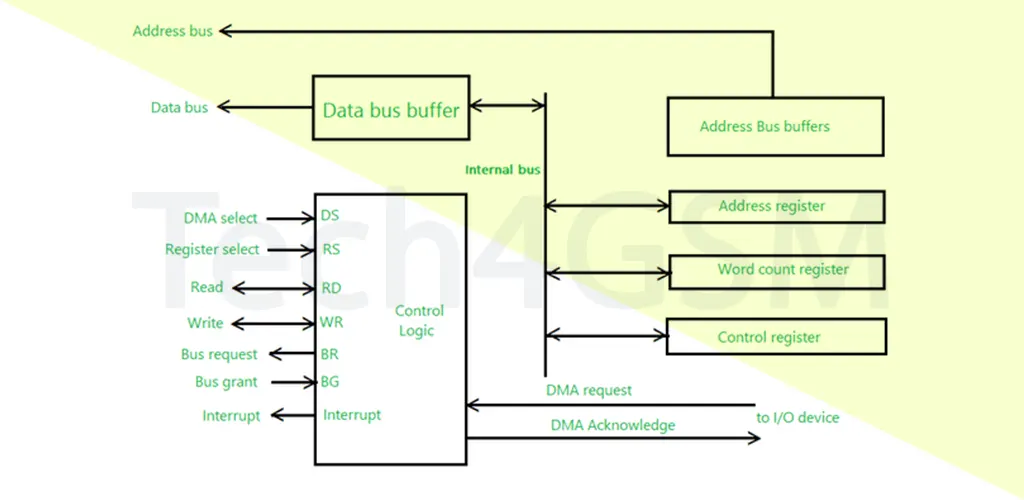
The DMA process involves a DMA controller, a specialized chip that manages data transfers. Here’s a breakdown:
DMA Controller Components
- Control Logic:
- The “brain” managing operations.
- Processes signals and directs data flow.
- DMA Request & Acknowledge:
- Request: A peripheral asks to start a transfer.
- Acknowledge: The controller confirms readiness.
- Bus Request & Grant:
- Request: Controller seeks memory bus access.
- Grant: CPU yields control temporarily.
- Address & Data Buses:
- Address Bus: Specifies memory locations.
- Data Bus: Carries the actual data.
- Registers:
- Address Register: Holds memory start address.
- Word Count Register: Tracks data size.
- Control Register: Manages transfer direction (read/write).
- Interrupt Signal:
- Alerts the CPU once the transfer completes.
Step-by-Step DMA Transfer
- A peripheral (e.g., SSD) sends a DMA Request.
- The controller requests bus access via Bus Request.
- CPU grants control via Bus Grant.
- Data moves between the device and memory using the Address/Data Buses.
- Post-transfer, the controller sends an Interrupt to the CPU.
Types of DMA in 2025
DMA operates in multiple modes to suit different needs:
- Burst Mode:
- Transfers entire data blocks in one go.
- Pros: Ultra-fast.
- Cons: CPU locked out during transfer.
- Cycle Stealing Mode:
- Transfers one data unit at a time.
- Pros: CPU shares bus access.
- Cons: Slower than Burst Mode.
- Block Mode:
- Transfers organized data chunks.
- Pros: Efficient for structured tasks.
- Demand Mode:
- Waits for CPU idle time.
- Pros: Zero CPU disruption.
Advantages of DMA
- Speed: Bypassing the CPU accelerates transfers.
- Efficiency: CPU handles tasks like gaming or AI processing.
- Parallelism: Multiple DMA channels work simultaneously.
- Low Latency: Critical for real-time systems.
Disadvantages of DMA
- Complexity: Configuring DMA commands can be tricky.
- Compatibility Issues: Not all hardware supports the same DMA standards.
- Resource Conflicts: Multiple devices may clash over DMA access.
DMA vs. DVMA
- DMA: Uses physical addresses for direct transfers.
- DVMA (Direct Virtual Memory Access): Uses virtual addresses, ideal for systems with virtual memory.
Use Cases of DMA in 2025
- Audio/Video Processing: Smooth playback without CPU lag.
- Network Data Transfers: High-speed packet handling.
- Storage Systems: Rapid SSD/HDD read/write operations.
- Gaming Consoles: Seamless texture loading.
FAQs
Q: Is DMA a processor?
A: No, DMA is a controller that manages data transfers independently.
Q: What are DMA’s transfer modes?
A: Burst, Cycle Stealing, and Transparent Mode.
Q: Can DMA cause system crashes?
A: Rarely, but misconfigurations may lead to conflicts.
Q: Why is DMA critical for AI?
A: It speeds up data flow for machine learning models.
Conclusion
In 2025, DMA remains vital for high-performance computing, IoT, and next-gen tech. By mastering DMA, developers can unlock faster, smarter systems.