Introduction
The File Allocation Table (FAT) is a foundational file system architecture that revolutionized digital storage. Designed for simplicity and cross-platform compatibility, FAT remains a go-to choice for removable media, embedded systems, and devices requiring lightweight file management. Despite newer systems like NTFS and APFS offering advanced features, FAT’s legacy endures in 2025. In this guide, we’ll explore FAT’s history, mechanics, variants, pros, cons, and its relevance in modern tech.
What is FAT?
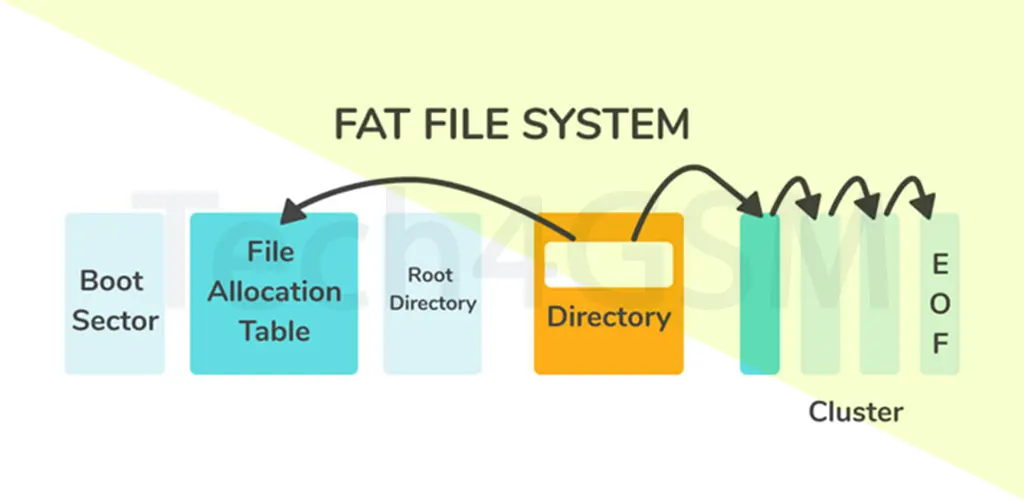
FAT stands for File Allocation Table. Developed by Microsoft in 1977, it’s a file system that organizes data on storage devices like USB drives, memory cards, and hard disks. The system uses an index table to track file locations, cluster allocations, and directory structures.
Key Components of FAT:
- Table Structure: Acts like a map, listing clusters (small storage units) and their status (free, in-use, or damaged).
- Directories: Folders store file names, sizes, and starting cluster addresses.
- Boot Sector: Contains critical info about the storage device (e.g., cluster size, FAT version).
History of FAT: From 1977 to 2025
1977: Marc McDonald developed the original 8-bit FAT for Microsoft Disk BASIC.
1980: FAT12 emerged with the IBM PC, supporting floppy disks and early hard drives (up to 32 MB).
1984: FAT16 debuted with MS-DOS 3.0, handling partitions up to 2 GB (later extended to 4 GB).
1996: FAT32 arrived with Windows 95 OSR2, boosting partition limits to 8 TB and file sizes to 4 GB.
2006: exFAT (Extended FAT) launched, optimized for flash drives and large files (e.g., 4K videos).
2025: FAT remains vital in IoT devices, gaming consoles, and legacy systems.
How FAT Systems Work: A Step-by-Step Breakdown
- Cluster Allocation:
- Storage devices are divided into clusters (e.g., 4 KB each).
- Each file occupies one or more clusters.
- FAT Table Entries:
- The table tracks cluster chains. For example:
- Cluster 1: File starts here.
- Cluster 2: Next cluster in the chain.
- 0xFFFF: End-of-file marker.
- The table tracks cluster chains. For example:
- Reading a File:
- The OS checks the directory for the file’s starting cluster.
- It follows the FAT chain until reaching the EOF marker.
- Writing a File:
- The OS finds free clusters, updates the FAT, and writes data.
Example: Saving a photo might use clusters 5 → 9 → 12. The FAT table links these clusters like a treasure map!
FAT Variants: Which One to Use?
- FAT12:
- 12-bit table entries.
- Max partition: 32 MB.
- Legacy uses: Floppy disks, early DOS systems.
- FAT16:
- 16-bit entries.
- Max partition: 4 GB (with 64 KB clusters).
- Compatible with cameras and MP3 players.
- FAT32:
- 32-bit entries (but uses 28 bits).
- Max file size: 4 GB; Max partition: 8 TB.
- Ideal for USB drives and SD cards.
- exFAT:
- 64-bit entries.
- Max file size: 16 exabytes (theoretical).
- Perfect for 4K videos and modern SSDs.
- FATX:
- Xbox gaming consoles use this modified FAT32 variant.
Advantages of FAT in 2025
- Lightweight Design:
- Minimal overhead, making it ideal for low-resource devices.
- Universal Compatibility:
- Works with Windows, macOS, Linux, Android, Smart TVs, and game consoles.
- Easy Recovery:
- Simple structure aids in data recovery tools.
- Plug-and-Play:
- No drivers needed for most devices.
- Cross-Platform Formatting:
- Convert FAT32 to NTFS without data loss (via Windows Disk Management).
Disadvantages of FAT in 2025
- File Size Limits:
- FAT32 caps files at 4 GB—problematic for HD videos or disk images.
- No Built-In Security:
- Lacks file permissions, encryption, or anti-tampering features.
- Fragmentation Issues:
- Frequent writes fragment files, slowing access speeds.
- No Journaling:
- Power failures can corrupt data (unlike NTFS’s journaling).
- Obsolescence:
- Newer systems like APFS and ReFS offer better scalability.
FAT vs. NTFS: Key Differences
| Feature | FAT32 | NTFS |
|---|---|---|
| Max File Size | 4 GB | 16 TB |
| Encryption | No | Yes (BitLocker) |
| Compression | No | Yes |
| Compatibility | All OS | Limited on macOS/Linux |
| Best For | Removable media | Internal drives |
FAQs About FAT
- Why is FAT still used in 2025?
- Its simplicity ensures compatibility with smart TVs, car stereos, and IoT devices.
- Can I use exFAT on Android?
- Yes! Most modern Android devices support exFAT for SD cards.
- How to fix a corrupted FAT table?
- Use tools like CHKDSK (Windows) or Disk Utility (macOS). For advanced recovery.
- Is FAT secure for sensitive data?
- No. Use NTFS or encrypted drives for sensitive files.
Conclusion: FAT’s Enduring Legacy
From floppy disks to IoT gadgets in 2025, FAT’s lightweight design and universal compatibility keep it relevant. While it lacks modern features like encryption, its simplicity makes it indispensable for cross-platform storage. As tech evolves, FAT variants like exFAT bridge the gap between legacy needs and modern demands.