
Introduction
When we send text messages to friends, family, colleagues, or other acquaintances, we normally expect a response. Sometimes, we eagerly wait, wondering if the recipient has seen the message. Luckily, most modern messaging apps have features like read receipts that let you know when your text has been delivered or read. For Android users, these features can vary depending on the platform. In this guide, we’ll explore how you can determine if your message has been read using popular apps such as Google Messages, WhatsApp, Facebook Messenger, Telegram, and Skype.
Google Messages
Google Messages has embraced the modern RCS (Rich Communication Services) protocol, which is gradually replacing traditional SMS. If you and the person you’re messaging both use RCS chat, Google Messages can provide read receipts.
To enable read receipts on Google Messages:
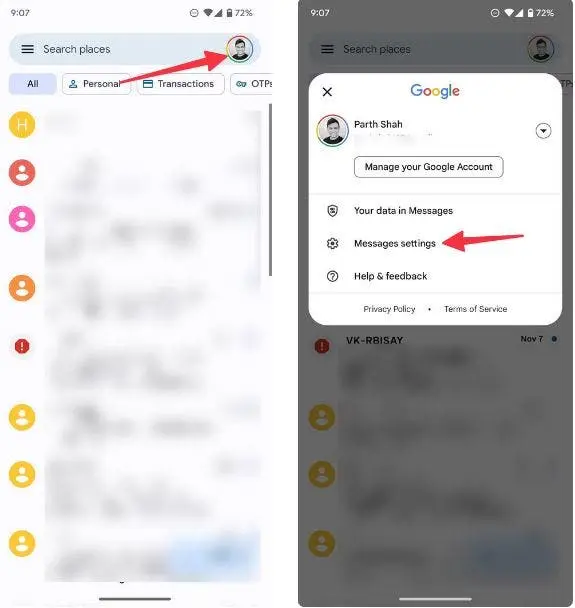
- Open the Messages app on your Android device.
- Tap your profile picture in the upper-right corner.
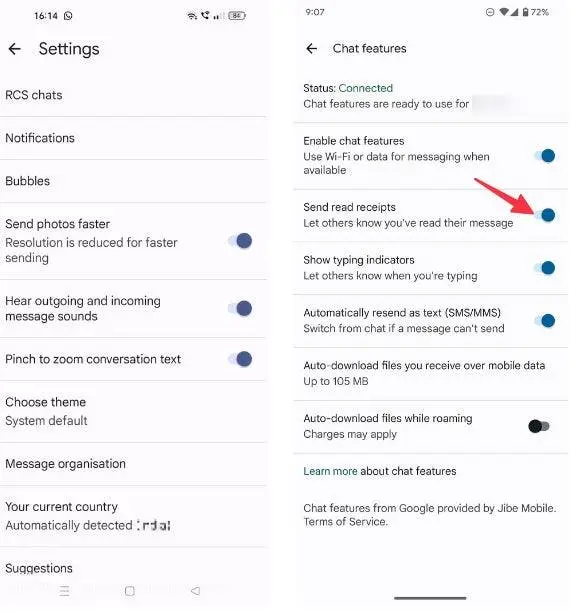
- Go to Messages settings and select RCS chats.
- Turn on the toggle for Send read receipts.
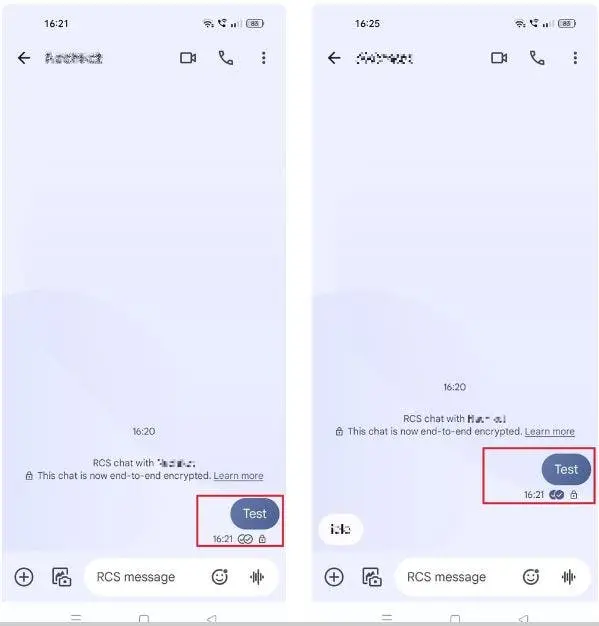
When enabled, you’ll see two checkmarks when your message is delivered and filled-in checkmarks when the message is read.
Note: This functionality only works if both users have RCS enabled. It may not work seamlessly across platforms, such as when messaging iPhone users.
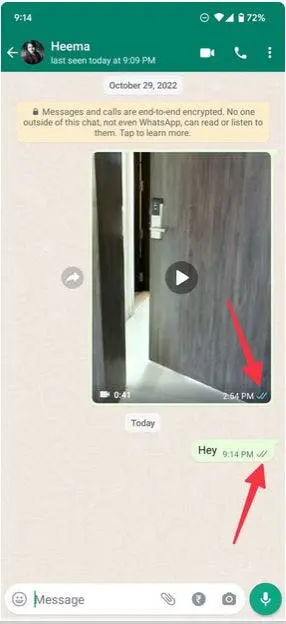
WhatsApp’s read receipt system is intuitive and widely recognized.
- A single gray checkmark means the message has been sent.
- Two gray checkmarks indicate delivery.
- Two blue checkmarks confirm the recipient has read the message.
Important Details:
- If the recipient views your message through the notification panel without opening the app, the blue checkmarks won’t appear.
- Users can disable read receipts for privacy.
To enable or disable read receipts in WhatsApp:
- Open WhatsApp and tap the three-dot menu in the upper-right corner.
- Navigate to Settings and choose Privacy.
- Toggle the Read receipts option on or off.
For group chats, you can see who read your message by:
- Long-pressing the message.
- Tapping the “i” (info) button.
- Viewing the list of members with read timestamps.
Facebook Messenger
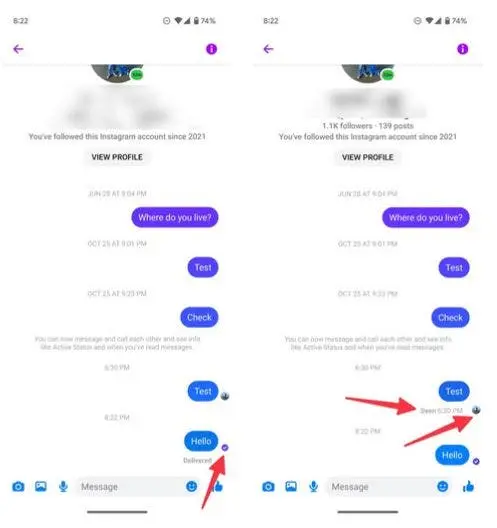
Facebook Messenger uses icons to indicate the status of your messages:
- An empty circle with a checkmark shows the message has been sent.
- A filled circle with a checkmark means the message has been delivered.
- The recipient’s profile picture replaces the checkmark when they read the message.
Additional Tip:
Tap the message to check its delivery and read status.
Note: Viewing messages through notification previews doesn’t trigger read receipts, so a message might have been seen even if it doesn’t show as “read.”
Telegram
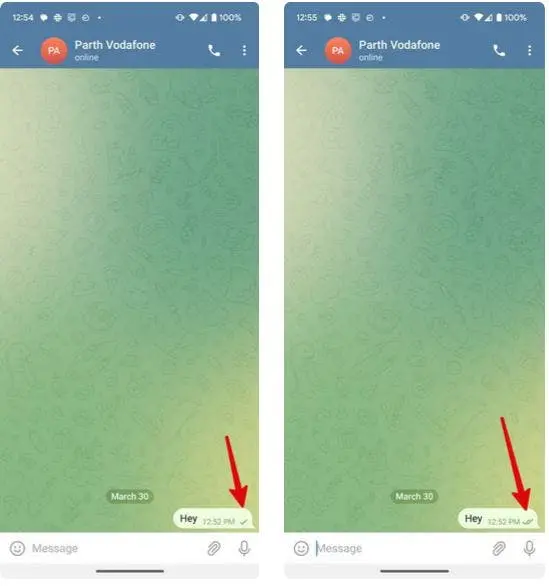
Telegram’s read receipt system is simple yet effective:
- A single checkmark indicates the message has been delivered.
- Two checkmarks mean the recipient has read the message.
Unlike WhatsApp, Telegram doesn’t provide detailed timestamps for when a message was read. Additionally, there’s no option to disable read receipts, ensuring transparency.
Skype
Skype offers basic read receipt functionality:
- When you send a message, you’ll see the recipient’s profile picture below the message once they’ve read it.
- This feature works for both one-on-one chats and group conversations.
Limitations:
Skype doesn’t provide detailed timestamps or additional delivery details, but the profile picture serves as a clear indication that the message has been read.
Why Read Receipts May Not Always Work
While read receipts are incredibly useful, several factors can affect their functionality:
- Platform limitations: Not all devices support advanced messaging protocols like RCS, limiting read receipt functionality.
- Privacy settings: Many apps allow users to disable read receipts for privacy.
- Cross-platform compatibility: Messaging between Android and iPhone users can lead to inconsistent read receipts.
- Notification previews: If the recipient reads your message through a notification preview, it might not register as “read” in the app.
Conclusion
Read receipts have become an essential feature in modern messaging, offering clarity on whether a message has been delivered or read. These indicators, available across platforms like Google Messages, WhatsApp, Facebook Messenger, Telegram, and Skype, add transparency to digital communication. For Android users, enabling and understanding these features can enhance the messaging experience by reducing uncertainty.
However, it’s important to acknowledge the limitations of read receipts. Platform compatibility, privacy settings, and notification behaviors can all affect their reliability. Misinterpreting a delay in a read receipt can lead to unnecessary frustration.
By learning how read receipts work in various apps, you can manage your communications more effectively. Whether it’s knowing if your message was seen or respecting someone’s privacy settings, understanding these tools promotes smoother and more respectful interactions. In the end, clear communication isn’t just about knowing if a text was read—it’s about fostering thoughtful and considerate exchanges.