Introduction
In today’s data-driven world, businesses and individuals alike need efficient, reliable, and cost-effective storage solutions. Network Attached Storage (NAS) has emerged as a go-to option for centralized data management, enabling seamless file sharing, backups, and scalability. Let’s explore what NAS is, how it works, and why it might be the perfect fit for your storage needs.
What is Network Attached Storage (NAS)?
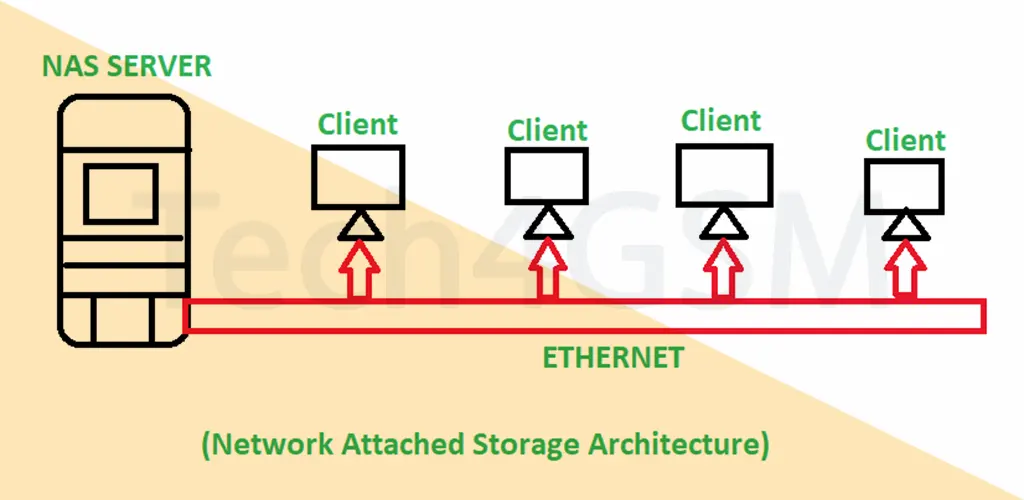
Imagine having a dedicated “digital locker” that everyone in your home or office can access at the same time. That’s essentially what a NAS is! It’s a specialized storage device connected to your network (via Wi-Fi or Ethernet) that allows multiple users and devices to store, retrieve, and manage data from a single location. Unlike traditional external hard drives tied to one computer, NAS acts as a shared hub for all your files—documents, photos, videos, and more.
How Does NAS Work?
A NAS system has three core components:
- Hardware: A compact server with storage drives, a processor, and RAM.
- Software: A lightweight operating system (like Synology’s DSM) that manages data access.
- Protocols: Rules like SMB or NFS that let devices “talk” to the NAS over the network.
Example Setup:
- A small business uses a NAS to store client files. Employees access these files from their laptops, while the HR team backs up payroll data to the same system—all without clogging up individual computers.
Why Use NAS? Top 6 Applications
- Centralized File Sharing: Perfect for teams collaborating on projects.
- Automated Backups: Protect family photos or critical business data with RAID configurations.
- Media Streaming: Turn your NAS into a Netflix-like hub for movies and music.
- Remote Access: Grab files from your NAS while traveling (after secure setup).
- Cost Savings: Cheaper than cloud subscriptions for large data needs.
- Future-Proofing: Easily add more storage as your needs grow.
Choosing the Right NAS: Key Considerations
- Storage Capacity: Start with your current needs, but plan for growth. A 4-bay NAS lets you add drives later.
- Performance: Look for Gigabit Ethernet and SSD support for faster transfers.
- Data Protection: RAID 1 (mirroring) or RAID 5 (striping with parity) prevent data loss.
- Ease of Use: User-friendly interfaces like QNAP’s QTS simplify setup.
Pro Tip: For small businesses, models like the Synology DiskStation offer a balance of power and affordability.
NAS vs. SAN vs. DAS: Key Differences
| Feature | NAS (Network Attached Storage) | SAN (Storage Area Network) | DAS (Direct Attached Storage) |
|---|---|---|---|
| Connection Type | Connects via standard networks (Ethernet/Wi-Fi) | Uses a high-speed dedicated network (e.g., Fibre Channel) | Directly attached to a single device (e.g., USB, SATA) |
| Data Access | File-level sharing (NFS, SMB protocols) | Block-level access (iSCSI, Fibre Channel protocols) | Block-level access via direct hardware interface |
| Scalability | Easily scalable by adding more devices or drives | Designed for enterprise scalability with centralized management | Limited scalability; tied to one device |
| Performance | Ideal for file sharing; speed depends on network bandwidth | Optimized for high-speed, low-latency data transfers | Fast performance with minimal latency (no network overhead) |
| Management | User-friendly web interface for remote administration | Requires specialized tools and IT expertise | Managed locally through the connected device |
| Cost | Budget-friendly for small to medium setups | Expensive; suited for large enterprises | Low cost; ideal for personal/single-user use |
| Use Case | Collaborative file storage, backups, media streaming | Mission-critical databases, virtualized environments | Single-device storage (e.g., external HDD/SSD) |
| Redundancy | Supports RAID for data protection | Advanced redundancy (multipathing, failover) | Basic redundancy (depends on user configuration) |
Simplified Breakdown
- NAS:
- Think of it as a “shared network drive” for teams.
- Great for homes, offices, and remote collaboration.
- SAN:
- Acts like a “highway” for data in large enterprises.
- Built for speed and reliability in data centers.
- DAS:
- Your “personal storage locker” (e.g., external hard drives).
- Simple, fast, but limited to one user/device.
The Future of NAS: What to Expect in 2025
By 2025, NAS systems will likely:
- Support AI-Driven Management: Automate backups and security.
- Integrate with Hybrid Clouds: Sync seamlessly with services like Google Drive.
- Boost Speeds: 10 Gigabit Ethernet for 4K video editing.
- Enhance Security: Built-in ransomware protection.
FAQs
Q: Can I access my NAS from anywhere?
A: Yes! Configure remote access securely via VPN or services like Synology QuickConnect.
Q: Is NAS safe from hackers?
A: If secured properly—yes. Use strong passwords, enable firewalls, and update firmware regularly.
Q: What’s the biggest drawback of NAS?
A: Initial setup can be tricky for non-tech users. Start with plug-and-play models.
Conclusion
Whether you’re a parent safeguarding family memories or a business managing terabytes of data, NAS offers flexibility, security, and scalability. With advancements like hybrid cloud integration and AI tools on the horizon, NAS remains a future-ready solution.