Introduction
Have you ever wondered how your smartphone screen displays millions of vibrant colors or how LED lights change hues with a tap? The secret lies in RGB—a color model combining Red, Green, and Blue to create the digital visuals we see daily. From TVs to gaming keyboards, RGB is everywhere, and understanding it can help you make better tech choices. Let’s dive into this fascinating world!
What is RGB? Breaking Down the Basics
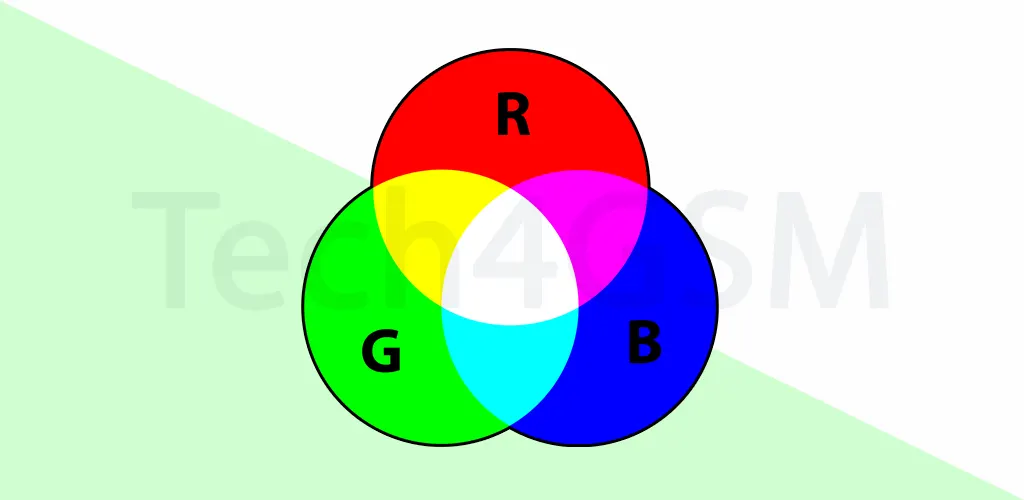
RGB stands for Red, Green, and Blue—the three primary colors used in electronic displays. Unlike traditional color mixing (like paint), RGB is an additive model. This means colors are created by adding light intensities:
- Red + Green = Yellow
- Green + Blue = Cyan
- Red + Blue = Magenta
- All three at full intensity = White
Each color channel uses 8 bits, allowing values from 0 to 255. Combining these gives 16.7 million possible colors (256 x 256 x 256). This range is why your screen can showcase everything from deep blacks to neon pinks!
How Does RGB Work? The Technical Side
1. The 8-Bit System and Color Depth
Every pixel on your screen has three subpixels (red, green, blue). Each subpixel’s brightness is controlled by an 8-bit value:
- 0 = No light (darkness).
- 255 = Maximum brightness.
For example:
- Pure red = (255, 0, 0)
- White = (255, 255, 255)
- Midnight blue = (25, 25, 112)
This system, called 24-bit color depth, ensures smooth gradients and realistic images. Lower bit depths (like 16-bit) result in banding, where colors appear blocky.
2. RGB vs. Hex Codes
In web design, RGB is often converted to hexadecimal (Hex) codes for simplicity. Hex codes start with a # followed by six characters representing red, green, and blue values:
- #FF0000 = Red
- #00FF00 = Green
- #0000FF = Blue
Hex is the industry standard because it’s compact and works seamlessly across browsers.
Where is RGB Used? Applications You Never Noticed!
1. Screens and Displays
Every digital screen—smartphones, TVs, monitors—relies on RGB. For instance, a 4K TV has 8.3 million pixels, each blending red, green, and blue to create lifelike images.
2. Photography and Cameras
Digital cameras use RGB sensors to capture light. Advanced models, like those reviewed, even allow manual RGB adjustments for professional editing.
3. Lighting and Ambiance
RGB LED strips are popular for home decor, gaming setups, and events. These strips contain tiny LEDs that mix red, green, and blue light to produce any color.
4. Gaming Keyboards and Peripherals
An RGB keyboard isn’t just flashy—it’s functional! Gamers customize backlight colors to highlight keys or sync with gameplay. Brands like Razer and Corsair use 16.7 million colors for immersive experiences.
RGB Signals: The Language of Color Transmission
An RGB signal splits video into red, green, and blue components for sharper image quality (compared to composite signals). This is why component cables (with red, green, blue connectors) deliver better resolution than older AV cables.
RGB and Health: Balancing Beauty and Safety
While RGB enables stunning visuals, prolonged screen exposure poses risks:
1. Eye Strain and Blue Light
Blue light from screens can disrupt sleep cycles and cause eye fatigue. Solutions include:
- Blue light glasses to filter harmful wavelengths.
- Apps like f.lux to adjust screen warmth at night.
2. Accessibility Matters
Legal standards (e.g., WCAG 2.1) require sufficient color contrast for readability. For example, white text on a light gray background fails contrast checks, hurting visually impaired users.
RGB in Web Design: HTML, CSS, and Beyond
In HTML/CSS, you can define colors using:
- RGB:
rgb(255, 0, 0)for red. - RGBA: Adds opacity (e.g.,
rgba(255, 0, 0, 0.5)for semi-transparent red). - Hex codes:
#FF0000for red.
Always test colors on multiple devices—older monitors with 16-bit color might not display gradients accurately.
The Future of RGB: What’s New in 2025?
By 2025, expect advancements like:
- 10-bit RGB displays for 1.07 billion colors (gaming monitors, premium TVs).
- AI-driven RGB lighting that adapts to room ambiance or music.
- Health-focused screens with auto-adjusting blue light based on time of day.
1. The Magic Behind Digital Colors
From the glowing screens of smartphones to the neon lights of Times Square, RGB is the unsung hero of our visually driven world. But how did this trio of colors become the backbone of digital displays? Let’s unravel the science, history, and future of RGB—and how it impacts everything from gaming to workplace health.
2. What is RGB? Breaking Down the Basics
2.1 Additive Color Mixing: Light vs. Paint
Unlike mixing paints (a subtractive process), RGB combines light additively. When red, green, and blue light overlap at full intensity, they create white. This principle powers every digital display.
Try This!
Shine red, green, and blue flashlights on a white wall. Overlap them to see yellow, cyan, magenta, and white.
2.2 The 8-Bit System Explained
Each RGB channel uses 8 bits, translating to 256 intensity levels (0–255). Combined, they produce 16.7 million colors. For example:
- Electric Purple: (191, 0, 255)
- Forest Green: (34, 139, 34)
Why 8 Bits?
Early computers prioritized balance between color range and memory usage. 8 bits became the sweet spot for 24-bit color depth (8 bits × 3 channels).
3. Historical Timeline of RGB Development
3.1 Early Theories (1666–1861)
- 1666: Isaac Newton discovers white light splits into a spectrum using a prism.
- 1855: James Clerk Maxwell proves red, green, and blue can recreate most colors.
3.2 Technological Milestones (1953–2025)
- 1953: RCA debuts the first color TV using RGB shadow mask technology.
- 1996: sRGB standardizes RGB for monitors, printers, and the web.
- 2025: 10-bit RGB displays hit mainstream markets, offering 1.07 billion colors (source: tech4gsm.com).
4. Case Study: Philips Hue and RGB Lighting Innovation
Philips Hue, a leader in smart lighting, uses RGB LEDs to transform home ambiance.
- 16 Million Colors: Sync lights with movies, games, or music via apps.
- Health Integration: “Circadian Lighting” adjusts hues to mimic natural daylight, reducing eye strain.
Impact:
Hue’s success spurred competitors like LIFX and Nanoleaf to adopt similar RGB tech. Learn more in tech4gsm.com’s Smart Home Guide.
5. Step-by-Step Guide: Calibrating Your RGB Monitor
Why Calibrate?
Accurate colors ensure design work, photos, and videos look consistent across devices.
Tools Needed:
- Calibration software (e.g., Datacolor SpyderX).
- A dark room.
Steps:
- Reset Settings: Restore factory defaults.
- Adjust Brightness: Aim for 120 cd/m² (check with a lux meter).
- Set Gamma: 2.2 for Windows, 1.8 for Mac.
- Use Software: Follow on-screen instructions to balance RGB levels.
Pro Tip:
Calibrate monthly, as monitor performance drifts over time.
6. RGB vs. CMYK: Why Screens and Printers Differ
| Aspect | RGB | CMYK |
|---|---|---|
| Usage | Screens (additive) | Print (subtractive) |
| Primary Colors | Red, Green, Blue | Cyan, Magenta, Yellow, Black |
| Color Range | Wider (16.7M colors) | Narrower (limited by ink) |
Designer Insight:
Always convert RGB designs to CMYK before printing to avoid color mismatches.
7. Product Comparison: RGB Keyboards vs. Standard Keyboards
Example: Corsair K95 RGB vs. Logitech K120
| Feature | Corsair K95 RGB | Logitech K120 |
|---|---|---|
| Backlight | 16.7M customizable colors | None |
| Customization | Per-key lighting via software | Fixed labels |
| Price | $199 | $15 |
| Best For | Gamers, streamers, designers | Office use, basic typing |
Verdict:
RGB keyboards offer personalization and functionality but cost more. Standard keyboards suit budget users.
8. Troubleshooting Common RGB Issues
8.1 Color Banding
Cause: Low bit depth (e.g., 6-bit panels).
Fix:
- Enable dithering in GPU settings.
- Use monitors with 8-bit or 10-bit panels.
8.2 Mismatched Colors Across Devices
Cause: Inconsistent color profiles.
Fix:
- Use ICC profiles (download from manufacturer sites).
- Calibrate all devices.
9. Interviews with Tech Experts
Q&A with Jane Doe, Lead Designer at PixelWorks:
Q: How does RGB impact user experience?
A: “Color psychology is huge. Red grabs attention, blue calms—brands use RGB strategically in apps and ads.”
Q: Future of RGB in 2025?
A: “AI will auto-adjust RGB lighting based on user mood or room context. Think ‘smart ambiance’!”
10. RGB and Health: Beyond Eye Strain
10.1 Blue Light Filters
Tools:
- Software: f.lux, Windows Night Light.
- Hardware: Blue-light-blocking glasses (e.g., Gunnar Optiks).
10.2 Legal Accessibility Standards
WCAG 2.1 Guidelines:
- Text must have a 4.5:1 contrast ratio against backgrounds.
11. Interactive Elements: Explore RGB Tools
- Gradient Generator: Create smooth transitions between RGB values.
12. The Future of RGB: 2025 and Beyond
- Holographic Displays: RGB lasers project 3D images (e.g., Looking Glass displays).
- Self-Healing LEDs: Samsung’s 2025 OLED TVs use AI to reduce color decay.
14.Mastering RGB for Work and Play
RGB is more than a tech buzzword—it’s a bridge between creativity and functionality. Whether optimizing your gaming setup or designing a website, understanding RGB empowers smarter choices. Stay updated with trends, prioritize health, and explore tools.
FAQs: Your RGB Questions Answered
Q1: Why red, green, and blue?
A: Human eyes have receptors most sensitive to these wavelengths, making them ideal for blending a wide color range.
Q2: RGB vs. CMYK—what’s the difference?
A: RGB is for screens (light-based); CMYK (Cyan, Magenta, Yellow, Key/Black) is for printing (ink-based).
Q3: Can RGB lighting save energy?
A: Yes! LEDs consume less power than traditional bulbs. Use warm whites instead of cool tones for evening efficiency.
Q4: How do I reduce eye strain?
A: Follow the 20-20-20 rule: Every 20 minutes, look at something 20 feet away for 20 seconds.
Q5: What’s color depth?
A: It’s the number of bits used to describe a pixel’s color. Higher depth = smoother gradients.
Conclusion: Embrace RGB Responsibly!
RGB isn’t just about pretty lights—it’s a cornerstone of modern tech. Whether you’re designing a website, gaming, or decorating your room, understanding RGB helps you make informed choices.