Introduction
In every home network, you’ll often hear about two key devices: a modem and a router. While a router creates a local network (LAN) to connect your devices, a modem acts as the bridge between your home and your Internet Service Provider (ISP). Both are essential for a functional home internet setup. Let’s break down what a modem does, how it works, and why it’s so important.
What is a Modem?
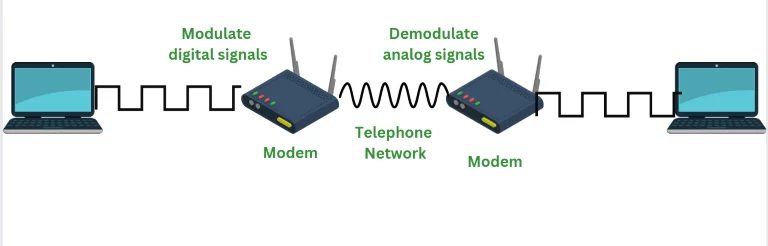
The term “modem” stands for Modulator/Demodulator. Think of it as a translator for your internet connection. Here’s why:
- Modulation: Converts digital data (0s and 1s) from your computer into analog signals that travel through phone lines or cables.
- Demodulation: Translates incoming analog signals from your ISP back into digital data your devices can understand.
In short, a modem lets your devices “talk” to the internet by converting signals into a language both sides understand. Without it, your computer couldn’t connect to the web!
Key Features of a Modem
- Dual Functionality: Modems handle both modulation and demodulation at the same time.
- Limited Connections: Most modems only support a few devices directly.
- Upgradeable: Some modems can be updated via software patches for better performance.
- ISP Configuration: Requires setup with your Internet Service Provider (like Comcast or AT&T).
- Speed Impact: Connecting a modem to a hub or switch may slow down data transfer.
How Does a Modem Work?
Let’s simplify the process:
- Data Creation: Your computer generates digital data (e.g., loading a webpage).
- Modulation: The modem converts this data into analog signals for transmission.
- Transmission: These signals travel via phone lines, cables, or satellites to your ISP.
- Demodulation: The modem translates incoming analog signals back into digital data.
- Delivery: Your computer receives the translated data, letting you stream, browse, or download.
Imagine mailing a letter: modulation is writing it in a code, and demodulation is decoding the reply.
Types of Modems
- Optical Modem: Uses fiber-optic cables for ultra-fast speeds (common in modern broadband).
- Digital Modem: Transfers digital data over digital lines, common in office networks.
- Cable Modem: Connects via cable TV lines (popular for high-speed home internet).
- Satellite Modem: Relies on satellite dishes for remote or rural areas.
- Dial-Up Modem: The oldest type, using phone lines with slow speeds (up to 56 Kbps).
Pros and Cons of Using a Modem
Advantages:
- Bridges your LAN to the internet.
- Handles signal conversion seamlessly.
- Affordable basic models available.
Disadvantages:
- Limited device connections.
- Security vulnerabilities if not paired with a router.
- Slows down when overloaded.
Modem vs. Router: What’s the Difference?
- Modem: Connects your home to the ISP (gets the internet).
- Router: Shares the internet with devices via Wi-Fi or Ethernet (distributes the internet).
You need both for a working home network.
FAQs
Q1: What are standard modems?
Standard modems use generic drivers and come as internal (built-in) or external (separate) devices.
Q2: Can a computer connect directly to an ISP?
No! Computers and ISPs use different “languages” (digital vs. analog). The modem acts as the translator.
Q3: What medium connects two modems?
Typically, telephone lines or dedicated circuits.
Q4: Why use a modem with a router?
A modem brings the internet home, while a router shares it with all your devices securely.
Final Thoughts
Modems are the unsung heroes of internet connectivity, working silently to keep you online. Whether you’re using a cable modem for gaming or a satellite modem in a rural area, understanding how they work helps you troubleshoot issues and optimize your setup.